Sunday, 16 September 2012

CICS communication history

In the beginning, CICS programmers used conversational transactions – but not any more. Pseudo-conversational coding is less resource-intensive, user think time costs are eliminated, and sites can run more simultaneous transactions. On the down side, programming is more difficult, application design requires re-starting programs, it’s more difficult to debug programs, and programs require an area to store data between tasks.
 

And so we get the Communication Area (COMMAREA). It’s a terminal-based scratchpad that’s dynamic in size (0 to 32,500 bytes), and is private and chained to the terminal. The COMAREA can hold data between pseudo-conversations, has a maximum in size of 32K, can be passed from program to program, can be empty, partially full, or full, and is automatically cleaned up when not used.

However, COMMAREAs have obvious limitations, and so IBM gave us channels and containers. There are no size limitations on data in containers, the number of containers in a channel is unlimited, and there can be separate containers for input and output.
Another way round COMMAREA limitations is to use an XML (eXtensible Mark-up Language) front-end application. Associated with this are:

  • Extensible Stylesheet Language Transformation (XSLT) is the recommended style sheet language of XML.
  • XML namespaces – in XML, element names are defined by a developer.
  • XML schema is an XML document that describes the structure and constrains the contents of other XML documents.
  • XML parser is a program that is invoked by an application to process an XML document, ensure that it meets all the rules of XML as well as the syntax of the DTD or schema, making the data available to the calling application.

With the introduction of Services Oriented Architecture (SOA), programmers now use CICS Web services. A Web service is a collection of operations that are network accessible through standardized XML messaging. The Web services architecture is based on interactions between three components: a service provider, which is the platform that hosts access to the service; a service requester, which is the application that is looking for and invoking or initiating an interaction with a service; and service registry, which is a place where service providers publish their service descriptions, and where service requesters find them.


Universal Description, Discovery and Integration (UDDI) is a specification for distributed Web-based information registries of Web services. The service provider “owns” the service, creates the WSDL (Web Service Description Language – see below), publishes the WSDL, and processes the requests. The service requester “finds” the service, binds to the service, and invokes the service using the WSDL. The service registry hosts the service description and is optional for statically bound requesters.


WSDL is an XML application for describing Web services. WSDL comprises:

  • Types – the data types in the form of XML schemas
  • Message – an abstract definition of the data in the form of a message
  • PortType – an abstract set of operations mapped to one or more end points
  • Binding – the concrete protocol and data formats for the operations
  • Service – a collection of related end points.

Simple Object Access Protocol (SOAP) is an XML-based protocol for the exchange of information in a distributed environment. A SOAP message is encoded as an XML document.
 

The CICS Web services assistant is a set of batch utilities that can help users transform existing CICS applications into Web services and to enable CICS applications to use Web services provided by external providers. The CICS Web services assistant comprises two utility programs:
  • DFHLS2WS generates a Web service binding file from a language structure. This utility also generates a Web service description.
  • DFHWS2LS generates a Web service binding file from a Web service description. This utility also generates a language structure that you can use in your application programs.

You can use Rational Developer for System z for Web services and XML development. A CICS pipeline is responsible for dealing with SOAP headers. It’s implemented as a series of programs, and can be configured by end users by using message handlers. A message handler is a program in which you can perform your own processing of Web service requests and responses.

Sunday, 9 September 2012

Back-ups, archives, and Pogoplug

Storage is always an issue. Whether you’ve got petabytes of it on your mainframe or just 16GB on your smartphone or tablet, the issues are always the same. You want speedy access to the data you’re using, and you want somewhere to store the data you’re not using at the moment – but might want to use it later.

Speeding access to data can be helped in a number of ways – storing the data contiguously, using indexes to speed up access to individual fields, using shorter paths from the storage medium to the processor, keeping recently used data in cache storage in the likelihood it will be used again. Human ingenuity has come up with lots of workarounds to ensure that you get the data as quickly as possible.

But there’s more of an issue with archived data. I could have immediate access to it, but then it would cost as much to store as live data. I could store it on some cheap medium and find it takes a week to get it back to a state that I can use. And something along those lines is used by many archiving organizations. Those tapes are stored inside a mountain somewhere, and the data can be restored – but not quickly.

Depending on the kind of business you’re in, someone has made a decision about costs and storage retrieval speed. If your company is in banking or insurance, that data might get back much faster than if your organization doesn’t promise its customers fast access to old data.

The advent of cloud computing added another layer of complexity to storage. You could store your data on the cloud – which, in psychology terms, is called a nominalization. You call it something, which seems to have meaning, but isn’t a concrete real thing – you can’t put it in a wheel barrow. You hear politicians use nominalizations all the time. I’ll vote for prosperity and world peace – but what does that actually mean? Prosperity for someone from a third world country might seem quite close to poverty to me! And world peace can always be achieved by having a tank on everyone’s lawn. Your idea of what is meant by a nominalization may be completely different from the idea held by the next person!

Anyway, I digress. So nowadays, you can store your data on the cloud. You don’t know where it’s physically stored you just know how to access it. And I assume much the same models are used for the price of cloud storage – fast access is dearer than slow access. Amazon came up with, what they call, Amazon Glacier. This is a cheap service for archived or backed up data that you don’t access very often. In line with that pricing model, retrieval can take several hours. Amazon Glacier only charges organizations for the storage space they use.

I’ve been using a Pogoplug for over two years and I’ve mentioned it in this blog a few times. A Pogoplug started life as a small device that plugged into your router and allowed you to plug in memory sticks that you could access from a browser anywhere. The company has recently expanded its cloud offerings and has done a deal with Amazon to offer cloud storage at a very competitive rate. The solution isn’t for mainframers, but makes sense for individuals and small companies.

The Pogoplug Web site at http://pogoplug.com gives all the price plans they’re offering. So, a small organization would be able to back up files from their computers, smartphones, and tablets to one secure location. All the company has to do is buy a Pogoplug device or download the Pogoplug Server software and run it on a Windows or Mac. They can then back-up and archive their files – and we’re talking terabytes of space. Users can continuously copy all or part of their data to Pogoplug’s secure offsite cloud. Any changes they make to their original folder will be synchronized automatically.

It seems like a useful addition to the all-important back-up and restore choices a company has to make.

Sunday, 2 September 2012

IBM's big baby

IBM has traditionally announced powerful mainframes in alternative years to more affordable models. Last year saw the z114, so this year we were expecting IBM to deliver something big – and that’s what it’s done with the zEnterprise EC (Enterprise Class) 12.

The zEC12 has a hexa-core design that runs at an eye-watering 5.5GHz and is pretty unique in supporting transactional execution. That means it treats system resources in much the same way as a transactional database system and so eliminates the overhead of software locking systems. You can expect to hear more about this Transaction Execution Facility. The z12 chip is implemented in a 32 nanometer high-K metal gate process – its predecessor (z11) used a 45 nanometer process.

The top end machines can take 120 cores, and the processors include an Enhanced DAT2 facility, which allows languages to exploit 2GB page frames. The processors also have a decimal-floating-point zoned conversion facility that will be supported by the next release of PL/I.

The zEC12 also supports Flash Express memory, which is used by systems that anticipate bursts of activity. And IBM claims this is one of the most secure enterprise systems ever with its Common Criteria Evaluation Assurance Level 5+ security classification. It even has a tamper-resistant cryptographic co-processor, which is called the Crypto Express 4s.

IBM said the new mainframe was the product of over $1bn in research and development investment and work was carried out in 18 IBM labs around the world and with IBM’s clients.

And as well as being the mainframe for the cloud computing generation, it also provides hybrid computing support. So not only can it run z/OS, users can consolidate their Linux workloads with Linux on System z (using SUSE Enterprise Server or Red Hat Enterprise Linux), and run other z/ operating systems – z/VM, z/VSE, and z/TPF. And the IBM zEnterprise BladeCenter Extension (zBX) lets users combine workloads designed for mainframes with those for POWER7 and x86 chips, Microsoft Windows Server.

The zEC12 increases the performance of analytic workloads by 30 percent compared to its predecessor. It seems that support for the DB2 Analytics Accelerator enables clients to run complex business analytics and operational analytics on the same platform. There are also IT systems analytics capabilities. It analyses internal system messages to provide a near real-time view of the system’s health, including any potential problems. Called IBM zAware, the technology learns from the messages to recognize patterns and quickly pinpoint any deviations, using the information to identify unusual system behaviour and minimize its impact.

Unusually, sites will be able to run the zEC12 without a raised data centre floor using new overhead power and cabling support. And for ‘green’ sites, zEC12 can deliver 25 percent more performance and 50 percent more capacity with the same energy footprint as its predecessor.

In a statement of direction, IBM said the zEC12 will be the last high-end System z server to offer support for zAAP specialty engine processors. Although IBM will continue to support running zAAP workloads on zIIP processors (zAAP on zIIP). This is intended to help simplify capacity planning and performance management, while still supporting all the currently eligible workloads.

The new processors should be available from about the end of September. It looks like a very powerful piece of kit with a number of interesting features that should keep mainframe users happy for a year or two.

Sunday, 26 August 2012

What can I say?

I’ve reviewed software that allows you to talk to your computer before. In fact I talked about Dragon NaturallySpeaking Version 9 in this blog back in January 2007. By then I’d gone from completely unimpressed to saying it’s worth a look. But I’ve just got my hands on Dragon NaturallySpeaking Version 12 from Nuance and I am very impressed!

I had to do a little bit of training in order for the software to recognize my voice and create my own personal profile – and that went fairly smoothly. But what was most impressive was the fact that it actually wrote what I said! In the past, I’ve played a game with my children where I’d say a few sentences, then they’d read what the software thought I’d said, and we’d repeat the process until gales of laughter overtook us reading the strange interpretations of our speech appearing on screen. But now my children are grown up, and so is this software. I found the accuracy of the product very good. I didn’t need to separate each word as I spoke – in fact, it recommended that I spoke in phrases. And it pretty much wrote on screen what I was saying.

The hard part for me was the controlling commands because I was unfamiliar with them, and to begin with I found myself wanting to just get my hands on the keyboard and make the correction quickly myself. To be fair, the people at Nuance understand this user frustration and they have put the Dragon Sidebar onscreen the whole time the software is in use. That makes it very easy to see the commands I need to use – for example saying: “delete ‘whatever’”, or “go to end of line”. I found that I was quite quickly remembering the commands that I used regularly and not needing to look them up. In addition, the software comes up with suggestions for what you might have said if you’re correcting and you can easily choose one of those alternatives. You simply say “correct ‘whatever’”, and then say “choose one” (or two or three – whichever is the better alternative).

As well as using the software with Word, it’s very easy to use it with Gmail, Hotmail, Facebook, and Twitter. You simply say: “post to Facebook” or “post to Twitter”. You can launch Word by saying: “Open Microsoft Word”. You can italicize, embolden, capitalize, insert lists, etc etc.

My version of the software came with a headset and microphone that I plugged into my laptop and which I used for most of this review. You can also download the Dragon Remote Microphone app for your phone. I used the Android version and there is a iPhone version. From the Profile menu, I selected “Add dictation source to current User Profile”. I selected “Dragon Remote Mic”. The laptop software then created a QR code that the software on my phone could scan. After that, I was connected. The only thing I needed to do was a little bit more voice recognition training. Once the training’s done, I can wander round my office talking to my phone and letting the words appear on my computer screen. As long as we’re on the same wifi network, it all works.

It’s very easy to tell the microphone to start listening and to stop – so that it doesn’t try to write down the whole of a telephone conversation that interrupts a session!

My conclusion this time is that the software is very easy to use and very accurate. It would make life very easy for someone who had problems using a keyboard and would not lead to the frustration experienced with much older voice recognition products. For able-bodied people, I think it makes a useful alternative input source, and the ability to walk around and talk – and then correct any errors later – makes it really useful for people, like me, who blog and write articles and often need to get a whole lot of ideas out of our heads onto paper (the screen) quickly.

Version 12 of Nuance’s Dragon NaturallySpeaking is definitely worth a 9 out of 10 score. And definitely worth seeing whether there’s a place for it in your organization or your home.
 

Saturday, 18 August 2012

Why is everyone talking about Hadoop?

Hadoop is an Apache project, which means it’s open source software, and it’s written in Java. What it does is support data-intensive distributed applications. It comes from work Google were doing and allows applications to use thousands of independent computers and petabytes of data.

Yahoo has been a big contributor to the project. The Yahoo Search Webmap is a Hadoop application that is used in every Yahoo search. Facebook claims to have the largest Hadoop cluster in the world. Other users include Amazon, eBay, LinkedIn, and Twitter. But now, there’s talk of IBM taking more than a passing interest.

According to IBM: “Apache Hadoop has two main subprojects:
  • MapReduce – The framework that understands and assigns work to the nodes in a cluster.
  • HDFS – A file system that spans all the nodes in a Hadoop cluster for data storage. It links together the file systems on many local nodes to make them into one big file system. HDFS assumes nodes will fail, so it achieves reliability by replicating data across multiple nodes.”

It goes on to say: “Hadoop changes the economics and the dynamics of large-scale computing. Its impact can be boiled down to four salient characteristics. Hadoop enables a computing solution that is:
  • Scalable – New nodes can be added as needed, and added without needing to change data formats, how data is loaded, how jobs are written, or the applications on top.
  • Cost effective – Hadoop brings massively parallel computing to commodity servers. The result is a sizeable decrease in the cost per terabyte of storage, which in turn makes it affordable to model all your data.
  • Flexible – Hadoop is schema-less, and can absorb any type of data, structured or not, from any number of sources. Data from multiple sources can be joined and aggregated in arbitrary ways enabling deeper analyses than any one system can provide.
  • Fault tolerant – When you lose a node, the system redirects work to another location of the data and continues processing without missing a beat.”

According to Alan Radding writing in IBM Systems Magazine (http://www.ibmsystemsmag.com/mainframe/trends/whatsnew/hadoop_mainframe/) IBM “is taking a federated approach to the big data challenge by blending traditional data management technologies with what it sees as complementary new technologies, like Hadoop, that address speed and flexibility, and are ideal for data exploration, discovery and unstructured analysis.”

Hadoop could run on any mainframe already running Java or Linux. Radding lists tools to make life easier like:
  • SQOOP – imports data from relational databases into Hadoop.
  • Hive – enables data to be queried using an SQL-like language called HiveQL.
  • Apache Pig – a high-level platform for creating the MapReduce programs used with Hadoop.

There’s also ZooKeeper, which provides a centralized infrastructure and services that enable synchronization across a cluster.

Harry Battan, data serving manager for System z, suggests that 2,000 instances of Hadoop could run on Linux on the System z, which would make a fairly large Hadoop configuration.

Hadoop still needs to be certified for mainframe use, but sites with newer hybrid machines (z114 or z196) could have Hadoop today by putting it on their x86 blades, for which Hadoop is already certified, and it could then process data from DB2 on the mainframe. But you can see why customers might be looking to get it on their mainframes because it gives them a way to get more information out of the masses of data they already possess. And data analysis is often seen as the key to continuing business success for larger organizations.

Sunday, 12 August 2012

IBM and RIM

There was a time when getting out your BlackBerry was synonymous with being a cool young executive. You can remember people who had phones that beeped every time they received an e-mail, and they would act like they were the Fonz. But then a different fruit became king of the hill – Apple. You weren’t anyone without an iPhone. And now it’s probably Android for the really cool kids because you can control it – without needing to jail break it!

BlackBerry had a second wind. Lots of youngsters used BlackBerries because of the messaging facility. They could chat to their friends – using BBM – for free.

Research In Motion (RIM) – the company that makes BlackBerry phones – is based in Waterloo, Ontario, Canada. In January this year, Thorsten Heins took charge as CEO. He must be wondering what he can do to re-invigorate the firm. But there’s more to RIM than just the BlackBerry phone. There’s meant to be a new BlackBerry 10 operating system coming out next year, but, perhaps more importantly, RIM has a BlackBerry Enterprise Services (BES) unit, which operates a network of secure servers used to support BlackBerry devices.

The rumour mill suggests that this is what IBM has its eye on. And this is the reason that RIM stock jumped up by 9 percent. Although, at this stage, it is only a rumour. Both companies are saying the usual thing about not commenting on rumours – instead of looking blankly at the questioner and going, “what!!”.

Were IBM to buy the whole of RIM, that would be a very bold decision. As I said, the BlackBerry 10 operating system doesn’t come out until early next year. It might be possible to licence the OS to third parties, or they could sell off RIM’s Network Operations Centre (NOC). The NOC transmits all BlackBerry data for both enterprise and consumers. If IBM were to keep the handset division, they would need to encourage developers to write apps for them. At the moment there are apps for iPhones, Android, and, when the new Surface tablet comes out with Windows 8, there’s likely to be a lot of development enthusiasm there. But I’m not sure there’s any real excitement to develop apps for the BlackBerry.

So, it’s more likely that IBM has its sights set on the enterprise services unit, which has pretty good security software that it uses to give IT departments control over corporate information. The encryption algorithms its uses make it very difficult for anyone to intercept e-mails or instant messages (BBM). This makes it very popular with people in banking and other financial services. According to RIM, there are 250,000 BlackBerry Enterprise Services (BES) servers installed worldwide.

However, if IBM doesn’t buy the NOC part of the business, they’ll need to come to some sort of working agreement with RIM (or whoever owns that part) over who has control over IBM’s customers’ traffic using it.

From a BlackBerry customer perspective, knowing IBM was looking after enterprise services would seem like a good thing. From IBM’s perspective, they would get access to a way of transmitting secure data from a platform that they don’t currently include in their portfolio – mobile computing. And IBM could add the software into (probably) WebSphere.

But whether IBM should do it or not depends on how much it’s going to cost them. RIM may well claim that they are making pots of money from the fees they charge mobile carriers for subscriber access to their network. They may say that the new operating system will see a resurgence of their popularity. If that were the case, then I would advise IBM to walk away now. If, on the other hand, IBM can get access to the security algorithms and the servers in use at financial institutions for a reasonable sum, then why not? Or if IBM thinks Oracle might be interested – then perhaps they should snap it up.

But, who knows? After all, it’s only a rumour!

Monday, 6 August 2012

Keeping it short

I was looking at my e-mail signature this week and thinking about what it needs to say. I then discovered that some of the hyperlinks in that signature were incredibly long – much longer than they needed to be. And I thought that perhaps other people might benefit from similarly shorter hyperlinks in their signatures.

So let’s have look at my old signature:

Trevor Eddolls CEO iTech-Ed Ltd
IBM Champion
P. 01249 443256 | M. 07901 505 609 | E-mail | Web site |
Blog | Twitter | Facebook | LinkedIn | Arcati Yearbook | Virtual IMS user group | Virtual CICS user group


The top line stays the same – it’s good to tell people who you are, your job title, and the name of the company in your signature!

I wanted to keep “IBM Champion” – I’ve been an IBM Champion since 2009.

And the phone numbers haven’t changed since 2004, although the devices I use have. I disconnected the fax a few years ago and finally threw it out last year!

It was that bottom list that caused the issues. My company has a (fan) page on Facebook, and that originally had a URL like http://www.facebook.com/pages/iTech-Ed-Ltd/201736748040. Since then, we’ve set up a username for it, so the address I wanted to publish was fb.com/itech-ed – which is obviously so much shorter. If you haven’t got a short name for your business page, you enter fb.com/username on the address line of your browser. Provided you have more than 25 likes on your page, Facebook will tell you whether you can have a short name for the page and whether your choice is available. The rule is that you only get one chance – so make sure you choose a good, memorable, and appropriate name.

I also wanted to add my Google plus address. The URL for that is https://plus.google.com/u/0/108580724051942905828/posts. You can get a much shorter name by going to http://gplus.to/. I got a short name from there. So, now, my Google plus address is http://gplus.to/teddolls.

With LinkedIn, I managed to change the address for my personal profile from http://www.linkedin.com/profile/view?id=3544583 to http://www.linkedin.com/in/teddolls, which makes more sense, but then requires a second click to get to the profile page. You can do much the same.

The Web site addresses I couldn’t really shorten without them losing a sense of where the link would end up. Just using bitly or tiny url wouldn’t have provided any sense of security to an e-mail recipient about where clicking on that link would actually end up.

What I decided to do with the look of my signature was to group social media on one line and other Web sites on a second line. This prevents that line of links sbeing too long itself!

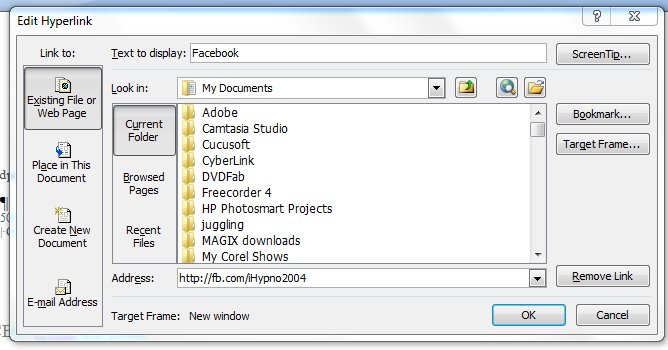
The easiest way to actually create the signature in the first place is to use Word. You can write the text and format it. The clever bit is to take a word – like Facebook – and put in the link. You simply select the word, press ctrl and k at the same time, and put the information you want in the pop-up box (see below).


Select “Existing File or Web Page” from the “Link to:” column on the left side of the box. Across the bottom of the box, it asks for the Address. This is the URL you want your word to hyperlink to. There’s one other clever thing you can do here. Where it says ScreenTip…”, you can enters some information that you want to appear when a person mouses over that part of your signature. So, for example, you might put “Find us on Facebook”, or “Follow us on Twitter” if it had been a link to your Twitter account. Click “OK” to save your changes – obviously! You can do that with each part of your signature. The ScreenTip acts in much the same way as adding a title tag to your html link.

So, not much of a change superficially, but some of those links are now shorter. Which means that my new-look corporate signature looks like:

Trevor Eddolls CEO iTech-Ed Ltd
IBM Champion
 
P. 01249 443256 | M. 07901 505 609 | E-mail | Web site |
Blog | Twitter | Facebook | LinkedIn | G+ |
Arcati Yearbook | Virtual IMS user group | Virtual CICS user group

You may not be too bothered about the appearance of my signature, but you might like to shorten some of the URLs hidden away in your signatures too.