Showing posts with label Facebook. Show all posts

Sunday, 30 March 2014

Tell me about this Yammer thing

I’ve been to a few companies recently that have been using Yammer as a business tool. If you’ve got offices that are spread out, or if your workforce aren’t usually in the office, then it provides an easy way for people to be able to share things – like comments, documents, or images. And you can form groups so discussions, that are only relevant to a small group of people, stay within that small group or team.

Yammer started life in 2008 and was bought by Microsoft in 2012. It’s described as an enterprise social network. That means it’s not a public social network like Facebook, it’s for internal communication between members of an organization or group.

It’s free, it’s very easy to use (if you’ve ever used Facebook), and it provides a private and secure place for discussion. The simplest way to use Yammer is from your browser (Explorer, Firefox, Chrome, etc), and you can download the app for your smartphone or tablet.

It’s easy to set up and use, but I thought I’d put together some instructions for new users, so they know how to get on and start using it.

To sign up, go to www.yammer.com. You’ll see a large box in the middle of the page:


Type in your company e-mail address – you can’t use your personal e-mail address because it won’t work.

Complete your Yammer profile and add a photo. New people in your organization may not be familiar with who you are and your particular skill set.

You can join groups and follow topics that are relevant to you. If Yammer gets very busy with people posting, you won’t want to be informed every time there’s a new post. So, click on the three dots in the upper right-hand corner. In the drop-down menu, select ‘Edit Profile’. Then select ‘Notifications’ from the list on the left, and then choose how often you want to receive notifications. ‘Save’ your choice. There’s a ‘Back Home’ box top-left to get back.

You can also follow other people – that way you get to see what they’re posting.

When you come to use Yammer on subsequent occasions, you simply click on ‘Log In’ on the right of the top menu bar.


Now you can start to use Yammer.

You can post messages – these can be comments, questions, updates. You can post links to articles or blogs elsewhere on the Web.

You can follow people, which means that you want to view messages from them in ‘My Feed’. It’s not like a friend request. They don’t have to agree. They don’t have to follow you back.

You can read what other people are posting and get a feel of what’s going on across the organization.

You can ‘Like’ other people’s posts.

You can find out more about people in your organization by reading their profile.

You could start your own group or join existing groups.

You can upload pictures. You can organize events/meetings. You can survey what people think about things

You can use topics so that all the posts are around a specific topic. To add a topic to a post, click ‘add topic’ while writing the message or you can use a hashtag. You can also add topics to a published message by clicking ‘more’. Hashtags (#) are used to identify what posts are about and to make finding information easier.

You can search for information in the search box near the top of the page. This will find whether anyone else has posted about a particular topic.

And you can send a direct message in three ways. Use the @ sign followed by the user’s names. As you start to type the name, a drop-down menu will give you suggestions. You can send a private message:
  • Click ‘Inbox’ in the left column.
  • Click ‘Create Message’ on the right sidebar.
  • Select ‘Send Private Message’.
  • In the ‘Add Participants’ field, start to type the person’s user name. A drop-down list of matching user names appears.
  • Select the name of the name of the person you want to send the message to.
  • Write your message, and then ‘Send’.
And you can send a message through ‘Online Now’:
  • Click ‘Online Now’ in the bottom-right corner.
  • Start writing the person’s name. A drop-down list of matching user names appears.
  • Use the up and down arrows, and ‘Enter’ to select a name. A message box opens.
  • Write your message, and then ‘Send’.
Recipients are notified that they have a message.

Unbelievably, Yammer refers to all communications inside Yammer as “Yams”. Yams are sorted into various feeds. A feed, if you’re new to social media, is a way of keeping you up-to-date with content that other people are posting.

I think many organizations would benefit from an internal social media tool. There are alternatives to Yammer available, but I think it can be very useful within an organization to help with communication. And it can be fun!

Saturday, 1 March 2014

Big Data 2.0

We were only just beginning to get our heads around Hadoop and Big Data in general when we find everyone is starting to talk about Big Data 2.0 – and it’s bigger, faster, and cleverer!

Hadoop, as I’m sure you know, is an open source project, and it’s available from companies like IBM, Hortonworks, Cloudera, and MapR. It provides a storage and retrieval method (HDFS – Hadoop Distributed File System) that can knock the socks off older, more expensive storage options on databases using SAN or NAS. It also means that more data can be stored. And that means not just human-keyed data, but data from the information of things (point of sales machines, sensors, cameras, etc) as well as social media. It’s an OCD sufferer’s dream come true. No need to delete (throw away) anything. But with all the data, it becomes important to find some way to ‘mine’ it – to derive information from the data that can be commercially useful. And that’s what’s happening, deeper and richer sets of results are being derived from the data that are beneficial to organizations.

With Version 2 of Hadoop, everything is faster. Data is processed at amazing speeds in-memory. The analysis is taking place at speed on terabytes of data. It also allows decisions to be made at speeds unavailable to humans. Research shows that algorithms with as many six variables out-perform human experts in most situations. This was tested on experts predicting the price of wine in future years and stock marketeers. So now, Big Data 2.0 means better decisions can be made at incredible speed.

It’s also possible for machines to learn using these techniques – such as the Google classic of having software that can identify the presence of a cat in video footage and no-one being quite sure how it is doing it.

For mainframe sites, Hadoop isn’t just some distant dream. You don’t need a room full of Linux servers to make it work – in fact that’s the clue to the solution. Much of this works very nicely on Linux on System z (or zLinux as many people still think of it). And once the data is on a mainframe, it becomes very easy to copy parts of it to a z/OS partition for more work to be done on the data. Cognos BI runs on the zLinux partition, so the first level of information extraction can be performed using that Business Intelligence tool. Software vendors are coming to market with products that run on the mainframe. BMC has extended its Control-M automated mainframe job scheduler with Control-M for Hadoop. Syncsort has Hadoop Connectivity. Compuware has extended its Application Performance Management (APM) software with Compuware APM for Big Data. And Informatica PowerExchange for Hadoop provides connectivity to the Hadoop Distributed File System (HDFS).

So what’s it like on the ground and away from the PowerPoint slides? At the moment, my experience is that really big companies – Google, Amazon, Facebook, and similar are pushing the envelope with Big Data. But it seems that many large organizations aren’t strongly embracing the new technology. Do banks, insurance companies, and airlines – the main users of mainframes – see a need for Big Data? Seemingly not – or not yet. Perhaps they are waiting for money to be spent and mistakes to be made before they adopt best practice and reap the benefits. Perhaps they are waiting for Big Data V3?

Big Data is definitely here to stay and those companies that could benefit from its adoption will gain a huge commercial advantage when they do.

Sunday, 9 February 2014

Social media update

Figures suggest that just about every successful company not only has a Web site, but also uses social media successfully. I thought it was time to take another look at what successful companies are up to and how they can monitor their success.

So just to recap, the big players in social media at the moment are probably Facebook, Twitter, LinkedIn, YouTube, Google+, and Pinterest. Published figures suggest that 72 percent of all the adults who are online use social networking sites. It’s also reckoned that 92 percent of companies use social media for recruitment. And 86 percent of employers say they research potential job candidates on social networks. Facebook claims to have over 1.19 billion users per month, and it has 728 million users each day. It also has around 9 million photos uploaded each month. 1 in 5 of 18 to 24-year-olds use Twitter each day, and Twitter say they’re adding 300 thousand users per day. Similarly, LinkedIn is growing – it increased by 105 percent between 2011 and 2013. And, of course, Facebook has got a lot attention this past week from the media and individual with its Look Back (https://facebook.com/lookback) short films showing what you’ve done on Facebook over the past 10 years

What many organizations are now setting as a social media goal is having ordinary users speak out for them. ‘Advocacy’ is the word that’s been hijacked for use in this situation. Companies are identifying potential customers or users and building strong relationships with them so that the customer will promote the product or company strongly on social media sites. So how can you build these important relationships? Feedback is an obvious way. Listen to what people are saying on social media and respond appropriately and quickly. To do this effectively, the social media team need to be integrated into the marketing and communications teams at a company. It doesn’t work if they are isolated within the organization. ‘Likes’ are an important place to start. Encourage people to ‘like’ your page, or ‘favorite’ a tweet.

It’s important that your social media presence has good content. You want people to keep coming back to read more. You can publicize products, and you can add more information about how to use your products, as well as answering users’ questions. You publicize great thing that staff or the company as a whole has done. This could be charity events, or prizes received. And you can advertise jobs. Make sure that good content is updated regularly and frequently. Then the next stage is to get product users to start adding content – photos of them using the product, reviews, how they used it to do something extra to its design spec! It’s at this stage that you can start monitoring and measuring interactions. Facebook pages contain lots of data. If you want measurement tools, there are: Crowdbooster, Demographics Pro, Moz Analytics, Simply Measured, Social Crawlytics, and True Social Metrics. If you want to listen to what people are saying (the technical term is sentiment) you can try Radian6, RowFeede, Sysomos, Topsy, or Vocus. For monitoring and responding there’s: BuddyMedia, Buffer, HootSuite, Meshfire, SocialEngage, and Sprout Social.

Not all social media has to be externally facing. You can have internal social media – allowing people from other departments to comment on developments, increase cross-team collaboration, and generally build up rapport between people. I’m very familiar with Microsoft’s Yammer, which is free and creates an easy-to-use forum. Other, similar, products are Chatter from Salesforce, Basecamp (which comes with a 60-day free trial), and Jive (originally called Clearspace).

If you start on social media, there are some terms that you need to be familiar with – for example sentiment, influence (measured by Klout and Social Authority), conversation drivers, engagement, timing, Click Through Rate (CTR), and followers and fans.

Get social media right, and you’ll stay in business. Get it wrong, or ignore it, and your organization could be heading for all sorts of trouble.

Sunday, 11 August 2013

Facebook and your business

Your organization can only stay in business if it sells products or services. And you can only sell stuff if people know what it is you have for sale. One way of achieving this is to use Facebook as a way of communicating with the public, and letting them communicate with you.

The first thing to do is to create a Facebook Page for your organization or product on Facebook – and you probably already have one.

One thing that Facebook introduced recently is the “Boost Post” button at the bottom of a post:


If you click on “Boost Post”, you’ll see:


Boosted posts are seen by existing fans and their friends. There is a facility for targeting by location, age, gender, and language, but not by interests or category. The posts are visible in news feeds on laptops and smartphones. Of course, you may not want to pay to get your message to people who have already liked your Page.

The advantage of using this technique is that you don’t need to understand how to create adverts, and you can set your own budget, whereas, if you’re advertising, you pay per click.

You can set a price limit for a boost – as long as it’s over $5. It’s possible to reach lots of people for a small amount of money. And you may find that other posts on your Page are being read by those friends of friends.

The alternative is to try Page Post Ads. Page Post Ads allow you to promote a post that you made on your Facebook Page, and they come in two types – there’s simple Page Post Ads, and Page Post Sponsored Stories. You have to use the ads create tool. The first thing to decide is whether you want to advertise a Page, event, app, or Web site. Facebook now provides image customization for Page Post link ads.

Before you start boosting posts or advertising, you’ll want to know how many people are actually looking at your Page. And you may be a little confused by some of the technical terms used by Facebook, when you look at the admin panel for your Page. Page ‘Likes’ is fairly obvious – the number of people who’ve liked your Page. But what about ‘Reach’? According to Facebook, Reach measures the number of people who received impressions of a Page post. The reach number might be less than the impressions number since one person can see multiple impressions. OK, you say, so what’s an ‘impression’? Again, Facebook tells us: Impressions measure the number of times a post from your Page is displayed, whether the post is clicked on or not. People may see multiple impressions of the same post. For example, a fan might see a Page update in News Feed once, and then a second time if their friend shares it.

At the bottom of a post you’ll see:


‘Like’ allows people to say they like the post. ‘Comment’ obviously allows people to comment, and ‘Share’ allows people to share the post with their friends. And these numbers are shown on the Admin panel.

‘People Talking About This’ is defined by Facebook as the number of people who have created a story from your Page post. They add that stories include: Sharing, liking or commenting on your post; Answering a question; Responding to an event; and Claiming an offer. Finally, ‘Engaged Users’ is the number of people who have clicked anywhere on your post.

As well as looking at the ‘Reach’ figure, you can look at the bottom of each post to see how many people have seen a post. If you move your mouse over this, you’ll see a pop-up window showing how many ‘Organic’ and ‘Viral’ views there have been.

Organic is the number of people who saw a Facebook Page post through their News Feed, Ticker, or on the Facebook Page itself. It’s usually the highest number.

Viral counts the number of people who’ve accessed a Page post from one of their Facebook friends. Cute animals and ‘uplifting’ phrases are often shared by people, and so the viral number can increase.
Paid Reach is the number of people who saw a post in an ad or sponsored story.  All three types added together give the total reach for a post.

And how do you get people to visit your Page and like it? Here are some suggestions:
•    Post frequently – at least once a day
•    Post pictures – they’re more likely to be commented on and shared
•    Post short comments rather than longer ones
•    Post questions – so people will answer them
•    Ask people to like, share, or comment on posts
•    Run contests to get more likes
•    Try to be entertaining and educational.

Whatever you do, you want people to come to your Page and you want them to return regularly, and, most importantly, you want them to buy your product or service.

And while we’re talking Facebook, click on the link and Like the iTech-Ed page at https://www.facebook.com/iTechEd.

Sunday, 5 May 2013

Using social media - Badminton

Badminton horse trials are taking place over the bank holiday weekend from Thursday 2 May to Monday 6 May this year. Badminton is one of those big events that horse lovers from all over the world like to attend – and so do I. And this week, I thought it would be interesting to have a look at how it does its IT. Bear in mind that it has lots of scores coming from different sources, as well as lots of photographs and film, that all need to be collated and shared with the fans who are onsite and off.

Badminton takes place in the park of Badminton House, in Gloucestershire GL9 1DF, England. The house and grounds are owned by the Duke of Beaufort. Badminton has been going since 1949 and is one of the top three four-star rated events (along with Burghley Horse Trials and Rolex Kentucky Three Day). It’s also one of only six annual Concours Complet International (CCI) Four Star events. Three-day eventing involves dressage, cross country, and show jumping.

I spoke to Dominic Sancto who gave me an overview of how things are set up at Badminton – as far IT is concerned.

This year, scores are entered into PCs and these results are wifi’ed across to Windows servers, where a bespoke database collects them all. From there, the results are written out to flat files and distributed accordingly. That means that the flat files are used to update the Web site and result screens, as well as the Badminton app.

There are three versions of the Badminton app, one for Android devices, one for iPhones, and one for iPads. The app gives details of the timetable and start times, as well as results. It also gives news and social information, video and audio, a photo gallery, the course, the riders, visitor information, and ‘grassroots’ – the BE 90 Class riders (that’s a lower group than the rest of the competitors, but everyone’s got to start somewhere!).

As well as the phone app and the Web site, Badminton’s social media has a Facebook page, Twitter, an RSS feed, Picasa, and YouTube. The Web site at www.badminton-horse.co.uk/ 

 has all the information that appears on the app and more. There’s information, tickets/hospitality, horses & riders, news, shopping village, gallery, and an archive. There is just so much information – it’s excellent.

When it comes to Twitter, there are seven members of the Badminton crew tweeting information, news , and comments about what’s going. You can find them at twitter.com/bht_office/badminton-crew. On Facebook, they’re at www.facebook.com/BadmintonHorseTrials. There were plenty of photos and comments before the event even started, and nearly 47,000 likes by last Monday. Not surprisingly, there are even more photos (including from previous years) on Picasa at picasaweb.google.com/baddershorsetrials. Like most organizations, Badminton IT has moved its movies to YouTube to avoid their own servers being overloaded. You can see plenty of videos at www.youtube.com/baddershorsetrials.

There’s also Radio Badminton on 106.1 FM – and you can buy ear-size radios so you can listen to everything that’s going on in the arena as you walk round the massive shopping village or follow the cross country course.

The whole of the IT is very well suited to the needs of the thousands of people who will be visiting Badminton this weekend. See you there!

Monday, 25 March 2013

Social businesses

What is a social business? Wikipedia tells me that a social business was first defined by Prof Muhammad Yunus as a non-loss, non-dividend company designed to address a social objective within the highly regulated marketplace of today. A wider definition includes any business having a social rather than financial objective. Or a social enterprise can be defined as a commercial activity by socially minded organizations. Perhaps a better definition these days is a business that has adopted social networking tools and practices for internal and external functions across their organization.

The IBM Web site tells us that: “Social business technologies help people connect, communicate, and share information. Becoming a leader in your marketplace means using social solutions to transform how business gets done – driving cost savings, increasing revenue, and cultivating competitive advantages.” That definitely sounds like a good thing.

In a report from Altimeter entitled The Evolution of Social Business: Six Stages of Social Business Transformation, it’s suggested that many social strategies are not linked to business goals, but are instead often driven by a “social for social’s sake” orientation. The report notes that, even when goals are aligned, social initiatives frequently must deal with a lack of defined strategy, governance, or funding. The report suggest six stages a company has to go through to become a social business:

  • Planning – understand how customers use social channels and prioritize strategic goals where social can have the most impact.
  • Presence – amplify existing marketing efforts and encourage sharing
  • Engagement – drive considerations to purchase and provide direct support with internal employee engagement.
  • Formalized – set governance for social, create discipline and process, and have strategic business goals.
  • Strategic – scale across business units and move into HR, sales, finance, and supply chain.
  • Converged – social drives transformation and integrates social philosophy into all aspects of the enterprise.
Becoming a social business is not something that can be left for tomorrow, organizations need to act now. They need to identify what it is they do well, and they need to get the message out there. And that last part comes with two health warnings! You need to be using the same social media as your clients and potential clients. If they don’t use the same media, they won’t see the message. Secondly, keep your eye on new media. Facebook, Twitter, Youtube, LinkedIn, Google plus may not always be kings of the heap. Pinterest is currently very popular. Watch out for trends – so you don’t lose that link with clients and potential clients. Maybe you should be looking at smartphone apps that will make it easy for people to come to you for whatever it is you supply.

Interestingly, there are products like Yammer (www.yammer.com), which Microsoft bought last year, Chatter, and others, that offer private social networks for organizations.

IBM VPs Jeff Schick and Sandy Carter were on stage at IBM Connect 2013 showing off the capabilities in IBM’s social business platform. It seems that companies are combining social technologies, the cloud, mobile, and analytics to create a flexible, intelligent framework for making the most of social connections. In an IBM survey of CEOs, 57% picked social business as a top priority and nearly three quarters (73%) are making significant investments in analysing data.

According to Jeff Schick: “A disconnect between how we live our lives
– through digital connections and sharing – and how we work isn’t sustainable. Particularly since the new generation of workers who will fill companies’ ranks don’t know any other way of interacting and working than social media. The rate of productivity, innovation, and employee retention will increasingly depend on who can master this coming age of social business.”

For an organization to just have a social media strategy isn’t enough. The organization must transform itself into a social business to ensure its continued success.

Monday, 6 August 2012

Keeping it short

I was looking at my e-mail signature this week and thinking about what it needs to say. I then discovered that some of the hyperlinks in that signature were incredibly long – much longer than they needed to be. And I thought that perhaps other people might benefit from similarly shorter hyperlinks in their signatures.

So let’s have look at my old signature:

Trevor Eddolls CEO iTech-Ed Ltd
IBM Champion
P. 01249 443256 | M. 07901 505 609 | E-mail | Web site |
Blog | Twitter | Facebook | LinkedIn | Arcati Yearbook | Virtual IMS user group | Virtual CICS user group


The top line stays the same – it’s good to tell people who you are, your job title, and the name of the company in your signature!

I wanted to keep “IBM Champion” – I’ve been an IBM Champion since 2009.

And the phone numbers haven’t changed since 2004, although the devices I use have. I disconnected the fax a few years ago and finally threw it out last year!

It was that bottom list that caused the issues. My company has a (fan) page on Facebook, and that originally had a URL like http://www.facebook.com/pages/iTech-Ed-Ltd/201736748040. Since then, we’ve set up a username for it, so the address I wanted to publish was fb.com/itech-ed – which is obviously so much shorter. If you haven’t got a short name for your business page, you enter fb.com/username on the address line of your browser. Provided you have more than 25 likes on your page, Facebook will tell you whether you can have a short name for the page and whether your choice is available. The rule is that you only get one chance – so make sure you choose a good, memorable, and appropriate name.

I also wanted to add my Google plus address. The URL for that is https://plus.google.com/u/0/108580724051942905828/posts. You can get a much shorter name by going to http://gplus.to/. I got a short name from there. So, now, my Google plus address is http://gplus.to/teddolls.

With LinkedIn, I managed to change the address for my personal profile from http://www.linkedin.com/profile/view?id=3544583 to http://www.linkedin.com/in/teddolls, which makes more sense, but then requires a second click to get to the profile page. You can do much the same.

The Web site addresses I couldn’t really shorten without them losing a sense of where the link would end up. Just using bitly or tiny url wouldn’t have provided any sense of security to an e-mail recipient about where clicking on that link would actually end up.

What I decided to do with the look of my signature was to group social media on one line and other Web sites on a second line. This prevents that line of links sbeing too long itself!

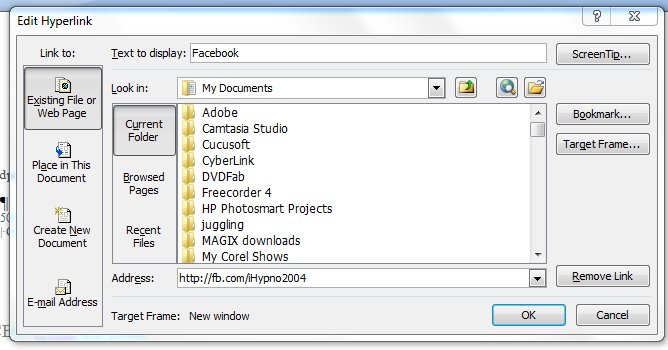
The easiest way to actually create the signature in the first place is to use Word. You can write the text and format it. The clever bit is to take a word – like Facebook – and put in the link. You simply select the word, press ctrl and k at the same time, and put the information you want in the pop-up box (see below).


Select “Existing File or Web Page” from the “Link to:” column on the left side of the box. Across the bottom of the box, it asks for the Address. This is the URL you want your word to hyperlink to. There’s one other clever thing you can do here. Where it says ScreenTip…”, you can enters some information that you want to appear when a person mouses over that part of your signature. So, for example, you might put “Find us on Facebook”, or “Follow us on Twitter” if it had been a link to your Twitter account. Click “OK” to save your changes – obviously! You can do that with each part of your signature. The ScreenTip acts in much the same way as adding a title tag to your html link.

So, not much of a change superficially, but some of those links are now shorter. Which means that my new-look corporate signature looks like:

Trevor Eddolls CEO iTech-Ed Ltd
IBM Champion
 
P. 01249 443256 | M. 07901 505 609 | E-mail | Web site |
Blog | Twitter | Facebook | LinkedIn | G+ |
Arcati Yearbook | Virtual IMS user group | Virtual CICS user group

You may not be too bothered about the appearance of my signature, but you might like to shorten some of the URLs hidden away in your signatures too.

Sunday, 25 September 2011

Web 3.0 and Facebook

Keen as I am on selling my company’s services to help other organizations make the best use of social media, I never thought that I would be focusing a blog on our old friend Facebook. And yet, this week’s announcements at the F8 developer conference seem to have taken Facebook out of the ‘me-too’ duel with Google plus and Twitter and, in a quantum leap, put it way ahead of the game. Bringing Tim Berners-Lee’s vision of a Semantic Web closer.

Facebook recently allowed us to separate our real friend from our ‘Facebook friends’ in a similar way to Google plus’s circles. Then they gave us the ‘Subscribe’ button, allowing us to filter what we read. We can subscribe to ‘all’ updates, ‘most’ updates, or ‘only important’ updates rather than get news of all the goings on of our friends. But then – like Twitter – you can subscribe to people you don’t even know, following their statuses and profile updates. Interesting, but, in many ways, underwhelming. Then they announced Timeline, which is a replacement for the current profile page. And then the big one – Open Graph.

Open Graph (a new class of app) will apparently enable Facebook users to share experiences in realtime. Users will be able to instantly share activities with their friends without being required to grant apps permission each time. The more business-oriented amongst you will realize that Facebook users will be sharing more data with friends, so with Graph Targeting the marketing people will be able to deliver specific marketing messages to the ideal target market.

But, apart from Mark Zuckerberg getting even more shedloads of money, this announcement moves us a step closer to the Semantic Web – or Web 3.0 as it’s sometimes called. Way back in 1999 Tim Berners-Lee said: “I have a dream for the Web [in which computers] become capable of analysing all the data on the Web – the content, links, and transactions between people and computers. A ‘Semantic Web’, which should make this possible, has yet to emerge, but when it does, the day-to-day mechanisms of trade, bureaucracy ,and our daily lives will be handled by machines talking to machines. The ‘intelligent agents’ people have touted for ages will finally materialize.”

The Semantic Web will, in many ways be computer driven rather than human driven, and will integrate information from many different sources. This is dependant on meta data being avilable – and in many ways, this is what will happen with Facebook’s new approach.

We can turn our Web pages into graph objects using the Open Graph protocol tags and the familiar Facebook Like button on those Web pages. The tags look like:


In addition to the Open Graph protocol’s four required properties:
  • og:title –t he title of the object as it should appear within the graph, eg a film title.
  • og:type – the type of your object, eg "movie".
  • og:image – an image URL, which should represent the object within the graph.
  • og:url – the canonical URL of tha object that will be used as its permanent ID in the graph, eg http://www.itech-ed.com/blog000.htm.

Facebook has added:
 
  • fb:app_id – a Facebook Platform application ID that administers this page.

And recommends using: 

  • og:site_name – a human-readable name for your site.
  • og:description – a one to two sentence description of your page.

When a user ‘likes’ a Web page using a Like button, a News Feed story is published to Facebook.

Wikipedia suggests that: “There are some who claim that Web 3.0 will be more application-based and centre its efforts towards more graphically-capable environments .” This is what Facebook’s Open Graph appears to be.

It also seems that some companies, such as those providing music streaming services, video streaming services, and newspapers will be able to customize the ‘Like’ button to say ‘listen’, ‘watch’, or ‘read’, as appropriate. Then, once someone has shared the content using these new buttons, other Facebook users will be able to access the content within Facebook provided the content supplier has created a compatible Facebook app.

Mainframers probably already know that IMS has a page at www.facebook.com/IMSFans, and CICS has a page at www.facebook.com/pages/CICS/133227520048745. You might not know that the Virtual IMS user group has a page at www.facebook.com/pages/Virtual-IMS-user-group/282385116069, and the Virtual CICS user group has a page at www.facebook.com/pages/Virtual-CICS-user-group/163022600420053.

Interesting times for Facebook and definitely putting some distance between it and its nearest rivals – for a while.

Sunday, 31 July 2011

All change!

It’s been a funny old week. IBM offering apps for mobile phones instead of sticking strictly to big iron, and Google buying a slew of IBM patents. When the British surrendered to the rebel American army at the end of the war of independence they played a tune called the world turned upside down. That’s what this week feels like.

It seems that Windows 7 smartphones aren’t really up there with the top three yet, because IBM has only made its app available to the app store for iTunes, Android, and the teenagers’ favourite, Blackberry. For IBM, the idea is to make their social networking platform, IBM Connections, available on smartphones – like Facebook and Twitter (and other social media). To be fair, you could access IBM Connections through a browser on these phones, but now there’s a proper app. Obviously there are different processes for making the app available for the different organizations, which will affect how quickly it will be before you can download the app on your device. The good news is that the app is free.

So what is IBM Connections? According to IBM’s Web site: “IBM Connections is social software for business that lets you access everyone in your professional network, including your colleagues, customers, and partners.

“The latest capabilities in IBM Connections, such as Moderation, Ideation Blogs, and the Media Gallery, enable you to embrace networks of people who are engaged and to work in transparent and nimble ways to create business value.”

It seems that the ideation and media gallery modules are natively available in the mobile apps. This allows users to vote on ideas, comment on ideas, and manage the ideas from their phones. In addition, users can take photos and upload them – so they can be shared immediately.

Built in to IBM Connections 3 are ‘moderation’, ideation blog’ and ‘media widget gallery’. Moderation allows users to review content in blogs, forums, and files before lications and approve, reject, or delete as appropriate. There’s a template available for each community to generate ideas, gather feedback, and come to consensus on the best ideas. This is the ideation blog. The media gallery widget is obviously somehwere to upload and share photos and videos.

Meanwhile, Google has confirmed that it bought 1,029 patents from IBM. These include SEO, servers, routers, relational databases, object-oriented programming, and fabrication and architecture of memory and microprocessing chips. It seems that no-one is revealing how much was paid.

Why would they buy so many patents? Perhaps to avoid litigation because they are using someone else’s idea. Or perhaps it’s to stop a rival company using someone else’s idea. It may be little more than synchonicity that Google has recently launched it’s Facebook-like Google plus. The more cynical among you may suggest they are looking for a way to stop Facebook doing something as yet undisclosed that will affect their business! Or it could be to do with the Android versus iPhone smartphone war. Or maybe its because Oracle is seeking billions of dollars in damages and royalties because of Google’s use of Java in Android phones. Or maybe, late in the day, Google has realized how important patents are in the modern business world.

Interestingly, Google was after 6,000 patents from Nortel Networks, but lost out to a consotium including Apple and Microsoft, who paid $4.5 billion for the patents. This could be the year of patent sales.

So there you have it. A week when the king of big iron turns up on the smallest of smart devices, and when Google gets itself a stash of patents. What will next week bring?

Sunday, 9 January 2011

Mainframe computing 2011

This is the time of year when people make predictions for what we can expect to see in the coming year, so here are my predictions...

I predict that the Arcati Mainframe Yearbook will appear in early January and be downloaded by around 15 000 mainframe professionals. The Yearbook includes an annual mainframe user survey, an up-to-date directory of vendors and consultants, a media guide, a strategy section with papers on mainframe trends and directions, a glossary of terminology, and a technical specification section.

I also predict the Virtual IMS user group will restart its virtual meetings and newsletters early in the New Year. Virtual IMS is a user group established as a way for individuals using IBM's IMS hierarchical database and transaction processing systems to exchange information, learn new techniques, and advance their skills with the product. The first virtual meeting takes place on Tuesday 8 February at 10:30 CDT. The presentation is by Fundi Software’s Jim Martin and is entitled, “Solving the problem when IMS isn't the cause”. Users might report slow response time from IMS, but you suspect that other systems are responsible. For example, what appears to be an IMS performance problem could be a CICS, DB2, WebSphere, or z/OS performance problem. Your challenge is to correlate performance data in IMS with activity in these other systems in order to discover the cause of the slow response time. This talk will explain how to do it.

With all the hype about cloud computing, 2011 is the year cloud computing will become commonplace. In many ways, this is a major technology change that is being driven by users. They like the simple life (or should I say, we like the simple life). It’s very easy to turn on your browser and have all the applications you want just there waiting for you – like the apps on your phone. You then use the applications as you want them. Users are looking for the same simplicity in their working environment and organizations are going to have to provide this paradigm-shift way of working.

And talking of smart phones, I predict that the device of choice is not going to be a small laptop or netbook, but a large smart phone (or small tablet). Something that you can fit in your pocket, but has everything you need to do a day’s work on it. And, of course, cloud computing makes this easier too.

I predict there will be more GUI-looking software on mainframes so that youngsters will feel right at home using the technology. And I predict there will be much more mainframe automation going on – which will allow the few experts available within an organization to do more work with fewer resources.

Social media will have embraced all sizes of businesses, so if you want to find out what IBM or any other major (or less major!) vendor is up to, you’ll be able to do it in the Twitter, Facebook, whatever, environment you are currently familiar with.

In the consumer market, I predict more people watching TV programmes through laptops and smart phones. It’s so easy and convenient to catch the latest news on a smart phone.

I predict that mainframes will NOT disappear in 2011.

I predict the arrival of more mainframe monitoring apps on smart phones – so you know straightaway if there is an issue with the network etc. You’ll then pull out your tablet or laptop and solve the problem using the nice GUI on the software.

I’d also like to predict world peace and harmony – maybe next year!

Sunday, 8 August 2010

Virtual IMS Connection user group - under threat

Virtual IMS Connection is a vendor-neutral, independently-operated, virtual user group for IMS (IBM's Information Management System) professionals. It can currently be found at www.virtualims.com. It was launched at the beginning of November 2007.

Virtual user group meetings take place every other month and a guest speaker gives a presentation relevant to the IMS user community. The user group meetings last a little over an hour in total. Participation in meetings is free to members. The Virtual IMS Connection user group is also free to join.

User group members also get a bi-monthly newsletter. You can see the flip-book version here and the PDF version here.

The Web site contains details of future meetings, information about IMS-related articles (published elsewhere on the Web) and events, a list of IMS tools (software - the listing is free to vendors) and services, a list of IMS consultants, and a job bank (with resumes - CVs - and job opportunities).

New IMS products and new versions of existing products are always included in the News page. There's a link to the IMS-L listserv, where IMS professionals can ask questions and share information.

Members can access PDF versions of presentations and PDF versions of newsletters.

The idea was to create a one-stop shop for IMS professionals, where individuals using IBM’s IMS hierarchical database and transaction processing systems could exchange information, learn new techniques, and advance their skills with the product.

Obviously, there are sponsorship opportunities available to vendors of IMS-related products to help fund this work. Vendors can place banner adverts, etc. However, since its inception, NEON Enterprise Software has provided Web hosting for the site, and funded the WebEx technology that we have used to make the regular webinars possible, as well as meeting other costs. This is now coming to an end, and the Virtual IMS Connection user group is looking for a new home.

If your organization might be able to help keep this important user group running, please contact me on trevor@itech-ed.com.

You can also find the user group on Twitter at twitter.com/VirtualIMS.
You can become a fan on Facebook at www.facebook.com/#/pages/Virtual-IMS-Connection-user-group/282385116069.

Let's hope that the Virtual IMS Connection user group can continue to share ideas, information, and skills into the future.

Monday, 31 May 2010

My personal cloud – Pogoplug reviewed

There are plenty of sites – like Facebook – that allow you to upload last night’s pictures and videos, but there’s always a problem with security. You hope that Facebook etc back-up their servers and archive the older stuff, so that, should they lose their main data disks, they can restore them. But that leads to another problem. That incredibly funny photo that we uploaded last year, might now be considered – even by us – to be in bad taste, and we don’t want copies of it lingering somewhere out there on almost completely-forgotten storage media. What if you could have full control over what you’re sharing and who can see it? What if you can add or delete files whenever you decide? Enter the perfect cloud storage system – the Pogoplug.

The Pogoplug simply connects to your router and allows memory sticks and external hard drives to be plugged into it. You can download an application that allows you to treat these storage devices as if they were connected to your laptop and then copy photos, videos, and music to them and make those photos, videos, and music tracks available across the Internet.

You can see a picture of a pink and white Pogoplug at www.pogoplug.com/. Let me tell you about setting it up. You plug one cable into the mains, and the other cable is a LAN cable that goes from the Pogoplug to a suitable connection socket in your router. You then connect a memory stick or whatever into one of the available sockets at the back (or there is one at the front). The light at the front of the Pogoplug goes green and you’re good to go.

Back on your computer you need to register on the my.pogoplug.com site. You can then use your browser to talk to the memory stick. I found it easier to download the free software that makes the Pogoplug appear to be an extra hard drive. It was just very easy to create directories and organize files. With so many slots on the Pogoplug you could plug in four 1TB external drives. That would be an enormous number of files you could share.

I can access my files on the Pogoplug whenever I want from wherever I want by logging into my.pogoplug.com and entering my e-mail address and password. I can add files, create directories, create slideshows, and share files or directories. I can also see files that other people have shared with me!

Looking at photos, for example from here, I can enlarge them, download them, delete them, or share them – all by clicking on an icon. If I want to share with one person or a few chosen people, I can enter their e-mail address in the box and invite them to share the file. I can even send them a personalized note with the link.

There is an alternative option. On the other sharing tab, called “more sharing options”, it’s possible to publish to Twitter, Facebook, and MySpace. You can also publish as an RSS feed and enable public viewing. This gives you a very long URL. I ran it through Tiny URL and sent that as a text message to a friend. But, it is simple enough to cut-and-paste the URL into an e-mail or even into a blog.

There is a feature that automatically copies photos, videos, music etc from my laptop to the Pogoplug. This software automatically synchronizes these folders whenever I’m connected, which means I’ve always got a back-up copy. This, of course, only works provided I have enough storage on the Pogoplug to handle the number of photos and amount of music and videos I have stored!

There’s apparently an iPhone app – hopefully there will be an Android one too soon.

Is it any good? Why is it cloud computing? It’s very easy to use and it’s useful to easily access photos particularly over the Internet. And that’s why it’s cloud computing – because you create a Web server and FTP files to it without needing to understand anything about these topics. It does make the area around your router look like a mini IT suite if you plug in external hard drives that require their own power supplies, but a couple of memory sticks don’t look too intrusive. But then, you’re restricted to how much you can store.

I thought it was great fun – and well worth having a look at.

Sunday, 16 May 2010

Microsoft, clouds, silver linings?

The big news of the week – even overshadowing IBM’s announcement of its latest five-year plan and market happiness at the news; even overshadowing the announcement of coalition government in the UK – was Microsoft’s launch of Office 2010 and SharePoint 2010!

Now, to the untrained eye, the launch of a new version of an Office suite would seem little more than a way of boosting sales in an already saturated market sector. After all, you might say, why not use OpenOffice, it’s free. Or, why not use Google Docs, which is not only free, but doesn’t use up any hard disk space! Well, even in that slow turning supertanker that’s the Redmond HQ of Microsoft, someone thought of that and started steering the ship away from those particular metaphorical rocks.

With Ray Ozzie (once king of Notes and Domino land) somewhere on the bridge of the supertanker, Microsoft has made a big deal of sharing documents – you can’t do that with OpenOffice – and cloud computing – you can’t do that with Google Docs – hang on a minute, oh yes you can do that with Google Docs, but you can’t do it so well with Microsoft Office originated documents!!

But what’s this about cloud computing and Microsoft?!?! Yes, Microsoft now brings you Office Web Apps. And what’s more, they will be offered free to the claimed 500 million users of Hotmail and Messenger. And rather cleverly – in terms of making this legacy Office product appealing to a more youthful audience – Microsoft has integrated Web Apps into Facebook – which you’ll remember it part owns – as Facebook Docs. This allows Facebook users to create and edit Word, Excel, and PowerPoint documents online. They can then share these files with their friends on Facebook, much like they would photos or videos.

On top of this, Microsoft is offering Office Live Workspace – free online document sharing (notice that word!) and storage. It says on the Web site that it stores up to 5GB online; works with Microsoft Office Word, Excel, and PowerPoint; and you can view, edit, share documents with password-protection.

Furthering the cloud idea is Microsoft Live SkyDrive, which (although not new) allows users to upload 25GBs of any type of file and then access it from any other computer they are on. Other products are available (as they say) including Amazon S3, Google Docs, and RackSpace Cloud Files. With SkyDrive, users drag-and-drop files onto the Web page. To make SkyDrive more usable, frequent users might like to download SkyDrive Simple Viewer for WebDAV from http://skydrivesimpleviewer.codeplex.com/, or SDExplorer from www.cloudstorageexplorer.com/.

To really get the best in an organization from sharing and collaboration, you also need to install the new SharePoint 2010.

One minor point, my beta copy of Office 2010 has seen the return of the File menu – well ribbon I suppose you’d call it – which disappeared in Office 2007. Other parts of the ribbon have been made more usable following customer feedback (or complaints as we’d call them!).

So, is Microsoft’s future cloudy? Will Google Docs now wither and die? Yes and no, are the answers in my opinion. Clearly, when you start looking at the nitty gritty detail, Microsoft has a way to go before it really offers cloud computing, but it’s moving in the right direction. Saying that, there are still millions of people who don’t need to share or collaborate on documents and who use only a tiny percentage of the facilities and features available in this venerable product. Certainly the Facebook Docs makes Office Web Apps seem cool and exciting for a new generation – the space that Google usually holds. I think fans of Google Docs will carry on as before. Large organizations (who haven’t got a mainframe and done proper computing!) will probably invest in SharePoint 2010 and Office 2010 once the first service pack has come round and assuming the licence price is affordable. It’s certainly a good move for Microsoft.

Sunday, 21 March 2010

Facebook and Twitter


The exciting news is that you can now stay up-to-date with all that’s happening in the IMS world, and with what’s happening with the Virtual IMS CONNECTION user group by following them on Twitter or becoming a Fan on Facebook – as well as by checking the Web site regularly at www.virtualims.com.


You could also add the Twitter and Facebook widgets to your Web sites, so not only do you stay in touch, but IMS professionals visiting your site will also be able to see the latest information. Examples of the widgets are shown below:

So, follow us on Twitter and become a fan on Facebook.


iTech-Ed Ltd is also on Twitter and Facebook. You can see all the latest blogs and other mainframe news on Twitter at twitter.com/t_eddolls. Or you can become a fan on Facebook by going to www.facebook.com/pages/iTech-Ed-Ltd/201736748040.

Sunday, 3 January 2010

Social media – a business tool

Social networks started off being ways to stay in contact with friends or make new friends. It also provided an easy way to share photos and therefore keep up with the activities of those friends that you see less often.

You can still do that, but nowadays social networks are becoming business tools and many organizations are already using them in that way. Intel, at the end of 2008, produced its social media guidelines and encouraged employees to use social media to get the corporate message out to as many people as possible.

So, if you’re not doing it already, what should you be doing? First of all there’s Twitter. Twitter was known only to a few people a year ago, but today it’s as well known as any other social media Web site. As you probably know, Twitter is a micro-blogging site allowing 140-digit messages to be sent. You have to publicize that you’re on Twitter so that people will “follow” you – ie read your tweets. You can tweet that you’re just enjoying a cup of coffee or whatever, but for business you probably want to tweet a news headline or an appointment date and time (like the next webinar or a conference). You then put a colon and a URL where people can read more details. It you have a series of tweets on the same topic, you can use hash tags (put a hash in front of a word that’s found in each tweet). And people can now re-tweet, which means they can pass on your tweet to their friends – extending the number of people who see your message. You can use a Twitter widget so your tweets appear in your Web page. That way people who browse your Web site can see the latest information you’re sharing. And you can use things like TweetDeck to see whether anyone else is tweeting about your company. You can find my tweets at twitter.com/t_eddolls.

One related thing with Twitter… it’s often a good idea to shorten URLs so they can be included with the text within the 140-character limit. Perhaps the two best-known sites for this are Bitly (bit.ly) and Tiny URL (www.tiny.cc). Example short URLs look like: http://bit.ly/6bVer5 or http://tiny.cc/MovBb. Other URL shortening organizations are available.

Facebook is also very useful for businesses. It’s easy to set up. I would recommend that you set up a new account so that anyone who becomes your friend doesn’t get access to pictures of you falling down drunk or whatever. Once you’ve set up a company name area on Facebook, anyone can become a fan. It also gives you the opportunity to post photos and meeting dates (in Events). You can also post information about your company and publish press releases, and use the “wall” to tie everything together. If you find people are putting negative comments, you will need to add positive ones so the bad ones disappear out of site further down the page. This can also be linked to Twitter. If you want to see a good example how it can be done, look for Marmite. I also include the Facebook widget on my home page as a second way of giving people up-to-date-information. You can become a fan of iTech-Ed here (http://www.facebook.com/pages/iTech-Ed-Ltd/201736748040?v=wall&ref=search).

In addition, you can have a presence on Linkedin (www.linkedin.com), Ecademy (www.ecademy.com), Fast Pitch (www.fastpitchnetworking.com), Plaxo (www.plaxo.com), Zoominfo (www.zoominfo.com), Naymz (www.naymz.com), and a host of other communities.

Get out there and blog. There are a few big blogging sites out there – Blogger (www.blogger.com), Typepad (www.typepad.com), and WordPress (wordpress.org) – and numerous others. Blogs can be used as ways of chatting about an event or a news item. It shows a friendly face for interacting with clients and potential clients. You should always Twitter a link to your blogs and put them on your corporate Facebook page.

You can also make all your news stories available through an RSS link. For example:
>a href="teblog.xml"
title="Subscribe to news about iTech-Ed" style=
"border:1px solid; border-color:#fc9 #630 #330 #f96; padding:0 3px; font-family:Verdana, Arial, Helvetica, sans-serif; font:bold 12px; color:#fff; background:#f60; text-decoration:none; margin:4px;"<
 RSS  >/a<

This bit of code gives you a button without needing a graphic. You will need an XML file with it, and numerous examples can be found using Google.


You hope that your “fans” will be monitoring changes on your Web site, and you can do the same with rival organizations by using a feed aggregator. For example, Google Reader lets you subscribe to your favourite Web sites so new content comes to you when it's posted. Reader keeps track of which things you’ve read so that you only see unread items when you come back. If there’s a dark blue border around an item, Reader is marking that item as read.

Another thing to be thought about is shared content. If you have content (and by that I mean photos or videos) that could be shared with a wider audience, you can put it on sites like YouTube (www.youtube.com), Flickr (www.flickr.com), SlideShare, and others.
What about MySpace (www.myspace.com)? It gives you the opportunity to create a Web site and listen to music – but if you already have a Web site, I'm not sure what advantage the extra Web presence would give you.

Social bookmarking is very interesting. It's a mechanism that allows people to share, organize, search, and manage bookmarks of Web resources. Users save links to Web pages that they want to remember and/or share. Many social bookmarking services provide Web feeds for their lists of bookmarks, including lists organized by tags. This allows subscribers to become aware of new bookmarks as they are saved, shared, and tagged by other users. Examples of these include Delicious (delicious.com), Digg (digg.com), Reddit (www.reddit.com), and StumbleUpon (StumbleUpon), but there are lots of others, with new ones arriving all the time. It’s a good idea to put these on news pages or blog pages, but they can go anywhere. However, this can become a bit of a nightmare because there are so many. I made a start by copying the icons and then using the following code (it went on, but you get the idea):

<a id="digg" title="Share this page on Digg" href="javascript:location.href='http://digg.com/submit?v=2&url='+encodeURIComponent(document.location.href)+'&title='+encodeURIComponent(document.title)+' '"> <img src="digg.jpg" width="25" height="25" alt="Share this page on Digg" title="Share this page on Digg" style="border:0"/> </a>

<a id="stumble" title="Share this page on StumbleUpon" href="javascript:location.href='http://www.stumbleupon.com/submit?v=2&url='+encodeURIComponent(document.location.href)+'&title='+encodeURIComponent(document.title)+' '"> <img src="su.jpg" width="25" height="25" alt="Share this page on StumbleUpon" title="Share this page on StumbleUpon" style="border:0"/> </a>


<a id="delicious" title="Share this page on del.icio.us" href="javascript:location.href='http://del.icio.us/post?v=2&url='+encodeURIComponent(document.location.href)+'&title='+encodeURIComponent(document.title)+' '"> <img src="del.jpg" width="25" height="25" alt="Share this page on del.icio.us" title="Share this page on del.icio.us" style="border:0"/> </a>


<a id="reddit" title="Share this page on Reddit" href="javascript:location.href='http://reddit.com/submit?v=2&url='+encodeURIComponent(document.location.href)+'&title='+encodeURIComponent(document.title)+' '"> <img src="reddit.jpg" width="25" height="25" alt="Share this page on Reddit" title="Share this page on Reddit" style="border:0"/> </a>

This is not the best way to do it!
My advice would be to use a single button that links to multiple bookmarking sites, for example AddToAny (www.addtoany.com) or AddThis (www.addthis.com)

While making sure that staff adhere to guidelines, I would recommend any organization raises its profile and gets into social media – until the next big thing comes along.