Showing posts with label Google plus. Show all posts

Monday, 25 March 2013

Social businesses

What is a social business? Wikipedia tells me that a social business was first defined by Prof Muhammad Yunus as a non-loss, non-dividend company designed to address a social objective within the highly regulated marketplace of today. A wider definition includes any business having a social rather than financial objective. Or a social enterprise can be defined as a commercial activity by socially minded organizations. Perhaps a better definition these days is a business that has adopted social networking tools and practices for internal and external functions across their organization.

The IBM Web site tells us that: “Social business technologies help people connect, communicate, and share information. Becoming a leader in your marketplace means using social solutions to transform how business gets done – driving cost savings, increasing revenue, and cultivating competitive advantages.” That definitely sounds like a good thing.

In a report from Altimeter entitled The Evolution of Social Business: Six Stages of Social Business Transformation, it’s suggested that many social strategies are not linked to business goals, but are instead often driven by a “social for social’s sake” orientation. The report notes that, even when goals are aligned, social initiatives frequently must deal with a lack of defined strategy, governance, or funding. The report suggest six stages a company has to go through to become a social business:

  • Planning – understand how customers use social channels and prioritize strategic goals where social can have the most impact.
  • Presence – amplify existing marketing efforts and encourage sharing
  • Engagement – drive considerations to purchase and provide direct support with internal employee engagement.
  • Formalized – set governance for social, create discipline and process, and have strategic business goals.
  • Strategic – scale across business units and move into HR, sales, finance, and supply chain.
  • Converged – social drives transformation and integrates social philosophy into all aspects of the enterprise.
Becoming a social business is not something that can be left for tomorrow, organizations need to act now. They need to identify what it is they do well, and they need to get the message out there. And that last part comes with two health warnings! You need to be using the same social media as your clients and potential clients. If they don’t use the same media, they won’t see the message. Secondly, keep your eye on new media. Facebook, Twitter, Youtube, LinkedIn, Google plus may not always be kings of the heap. Pinterest is currently very popular. Watch out for trends – so you don’t lose that link with clients and potential clients. Maybe you should be looking at smartphone apps that will make it easy for people to come to you for whatever it is you supply.

Interestingly, there are products like Yammer (www.yammer.com), which Microsoft bought last year, Chatter, and others, that offer private social networks for organizations.

IBM VPs Jeff Schick and Sandy Carter were on stage at IBM Connect 2013 showing off the capabilities in IBM’s social business platform. It seems that companies are combining social technologies, the cloud, mobile, and analytics to create a flexible, intelligent framework for making the most of social connections. In an IBM survey of CEOs, 57% picked social business as a top priority and nearly three quarters (73%) are making significant investments in analysing data.

According to Jeff Schick: “A disconnect between how we live our lives
through digital connections and sharing – and how we work isn’t sustainable. Particularly since the new generation of workers who will fill companies’ ranks don’t know any other way of interacting and working than social media. The rate of productivity, innovation, and employee retention will increasingly depend on who can master this coming age of social business.”

For an organization to just have a social media strategy isn’t enough. The organization must transform itself into a social business to ensure its continued success.

Monday, 6 August 2012

Keeping it short

I was looking at my e-mail signature this week and thinking about what it needs to say. I then discovered that some of the hyperlinks in that signature were incredibly long – much longer than they needed to be. And I thought that perhaps other people might benefit from similarly shorter hyperlinks in their signatures.

So let’s have look at my old signature:

Trevor Eddolls CEO iTech-Ed Ltd
IBM Champion
P. 01249 443256 | M. 07901 505 609 | E-mail | Web site |
Blog | Twitter | Facebook | LinkedIn | Arcati Yearbook | Virtual IMS user group | Virtual CICS user group


The top line stays the same – it’s good to tell people who you are, your job title, and the name of the company in your signature!

I wanted to keep “IBM Champion” – I’ve been an IBM Champion since 2009.

And the phone numbers haven’t changed since 2004, although the devices I use have. I disconnected the fax a few years ago and finally threw it out last year!

It was that bottom list that caused the issues. My company has a (fan) page on Facebook, and that originally had a URL like http://www.facebook.com/pages/iTech-Ed-Ltd/201736748040. Since then, we’ve set up a username for it, so the address I wanted to publish was fb.com/itech-ed – which is obviously so much shorter. If you haven’t got a short name for your business page, you enter fb.com/username on the address line of your browser. Provided you have more than 25 likes on your page, Facebook will tell you whether you can have a short name for the page and whether your choice is available. The rule is that you only get one chance – so make sure you choose a good, memorable, and appropriate name.

I also wanted to add my Google plus address. The URL for that is https://plus.google.com/u/0/108580724051942905828/posts. You can get a much shorter name by going to http://gplus.to/. I got a short name from there. So, now, my Google plus address is http://gplus.to/teddolls.

With LinkedIn, I managed to change the address for my personal profile from http://www.linkedin.com/profile/view?id=3544583 to http://www.linkedin.com/in/teddolls, which makes more sense, but then requires a second click to get to the profile page. You can do much the same.

The Web site addresses I couldn’t really shorten without them losing a sense of where the link would end up. Just using bitly or tiny url wouldn’t have provided any sense of security to an e-mail recipient about where clicking on that link would actually end up.

What I decided to do with the look of my signature was to group social media on one line and other Web sites on a second line. This prevents that line of links sbeing too long itself!

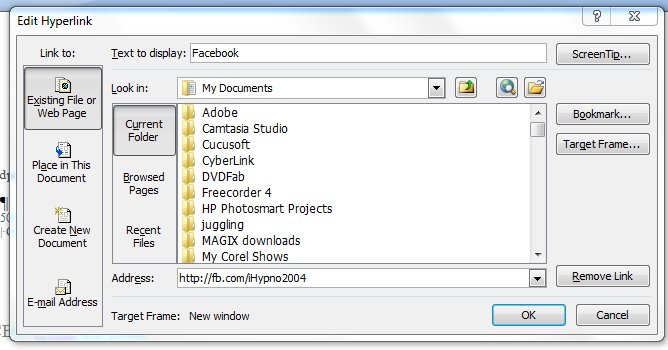
The easiest way to actually create the signature in the first place is to use Word. You can write the text and format it. The clever bit is to take a word – like Facebook – and put in the link. You simply select the word, press ctrl and k at the same time, and put the information you want in the pop-up box (see below).


Select “Existing File or Web Page” from the “Link to:” column on the left side of the box. Across the bottom of the box, it asks for the Address. This is the URL you want your word to hyperlink to. There’s one other clever thing you can do here. Where it says ScreenTip…”, you can enters some information that you want to appear when a person mouses over that part of your signature. So, for example, you might put “Find us on Facebook”, or “Follow us on Twitter” if it had been a link to your Twitter account. Click “OK” to save your changes – obviously! You can do that with each part of your signature. The ScreenTip acts in much the same way as adding a title tag to your html link.

So, not much of a change superficially, but some of those links are now shorter. Which means that my new-look corporate signature looks like:

Trevor Eddolls CEO iTech-Ed Ltd
IBM Champion
 
P. 01249 443256 | M. 07901 505 609 | E-mail | Web site |
Blog | Twitter | Facebook | LinkedIn | G+ |
Arcati Yearbook | Virtual IMS user group | Virtual CICS user group

You may not be too bothered about the appearance of my signature, but you might like to shorten some of the URLs hidden away in your signatures too.

Sunday, 25 September 2011

Web 3.0 and Facebook

Keen as I am on selling my company’s services to help other organizations make the best use of social media, I never thought that I would be focusing a blog on our old friend Facebook. And yet, this week’s announcements at the F8 developer conference seem to have taken Facebook out of the ‘me-too’ duel with Google plus and Twitter and, in a quantum leap, put it way ahead of the game. Bringing Tim Berners-Lee’s vision of a Semantic Web closer.

Facebook recently allowed us to separate our real friend from our ‘Facebook friends’ in a similar way to Google plus’s circles. Then they gave us the ‘Subscribe’ button, allowing us to filter what we read. We can subscribe to ‘all’ updates, ‘most’ updates, or ‘only important’ updates rather than get news of all the goings on of our friends. But then – like Twitter – you can subscribe to people you don’t even know, following their statuses and profile updates. Interesting, but, in many ways, underwhelming. Then they announced Timeline, which is a replacement for the current profile page. And then the big one – Open Graph.

Open Graph (a new class of app) will apparently enable Facebook users to share experiences in realtime. Users will be able to instantly share activities with their friends without being required to grant apps permission each time. The more business-oriented amongst you will realize that Facebook users will be sharing more data with friends, so with Graph Targeting the marketing people will be able to deliver specific marketing messages to the ideal target market.

But, apart from Mark Zuckerberg getting even more shedloads of money, this announcement moves us a step closer to the Semantic Web – or Web 3.0 as it’s sometimes called. Way back in 1999 Tim Berners-Lee said: “I have a dream for the Web [in which computers] become capable of analysing all the data on the Web – the content, links, and transactions between people and computers. A ‘Semantic Web’, which should make this possible, has yet to emerge, but when it does, the day-to-day mechanisms of trade, bureaucracy ,and our daily lives will be handled by machines talking to machines. The ‘intelligent agents’ people have touted for ages will finally materialize.”

The Semantic Web will, in many ways be computer driven rather than human driven, and will integrate information from many different sources. This is dependant on meta data being avilable – and in many ways, this is what will happen with Facebook’s new approach.

We can turn our Web pages into graph objects using the Open Graph protocol tags and the familiar Facebook Like button on those Web pages. The tags look like:


In addition to the Open Graph protocol’s four required properties:
  • og:title –t he title of the object as it should appear within the graph, eg a film title.
  • og:type – the type of your object, eg "movie".
  • og:image – an image URL, which should represent the object within the graph.
  • og:url – the canonical URL of tha object that will be used as its permanent ID in the graph, eg http://www.itech-ed.com/blog000.htm.

Facebook has added:
 
  • fb:app_id – a Facebook Platform application ID that administers this page.

And recommends using: 

  • og:site_name – a human-readable name for your site.
  • og:description – a one to two sentence description of your page.

When a user ‘likes’ a Web page using a Like button, a News Feed story is published to Facebook.

Wikipedia suggests that: “There are some who claim that Web 3.0 will be more application-based and centre its efforts towards more graphically-capable environments .” This is what Facebook’s Open Graph appears to be.

It also seems that some companies, such as those providing music streaming services, video streaming services, and newspapers will be able to customize the ‘Like’ button to say ‘listen’, ‘watch’, or ‘read’, as appropriate. Then, once someone has shared the content using these new buttons, other Facebook users will be able to access the content within Facebook provided the content supplier has created a compatible Facebook app.

Mainframers probably already know that IMS has a page at www.facebook.com/IMSFans, and CICS has a page at www.facebook.com/pages/CICS/133227520048745. You might not know that the Virtual IMS user group has a page at www.facebook.com/pages/Virtual-IMS-user-group/282385116069, and the Virtual CICS user group has a page at www.facebook.com/pages/Virtual-CICS-user-group/163022600420053.

Interesting times for Facebook and definitely putting some distance between it and its nearest rivals – for a while.