Figures suggest that just about every successful company not only has a Web site, but also uses social media successfully. I thought it was time to take another look at what successful companies are up to and how they can monitor their success.
So just to recap, the big players in social media at the moment are probably Facebook, Twitter, LinkedIn, YouTube, Google+, and Pinterest. Published figures suggest that 72 percent of all the adults who are online use social networking sites. It’s also reckoned that 92 percent of companies use social media for recruitment. And 86 percent of employers say they research potential job candidates on social networks. Facebook claims to have over 1.19 billion users per month, and it has 728 million users each day. It also has around 9 million photos uploaded each month. 1 in 5 of 18 to 24-year-olds use Twitter each day, and Twitter say they’re adding 300 thousand users per day. Similarly, LinkedIn is growing – it increased by 105 percent between 2011 and 2013. And, of course, Facebook has got a lot attention this past week from the media and individual with its Look Back (https://facebook.com/lookback) short films showing what you’ve done on Facebook over the past 10 years
What many organizations are now setting as a social media goal is having ordinary users speak out for them. ‘Advocacy’ is the word that’s been hijacked for use in this situation. Companies are identifying potential customers or users and building strong relationships with them so that the customer will promote the product or company strongly on social media sites. So how can you build these important relationships? Feedback is an obvious way. Listen to what people are saying on social media and respond appropriately and quickly. To do this effectively, the social media team need to be integrated into the marketing and communications teams at a company. It doesn’t work if they are isolated within the organization. ‘Likes’ are an important place to start. Encourage people to ‘like’ your page, or ‘favorite’ a tweet.
It’s important that your social media presence has good content. You want people to keep coming back to read more. You can publicize products, and you can add more information about how to use your products, as well as answering users’ questions. You publicize great thing that staff or the company as a whole has done. This could be charity events, or prizes received. And you can advertise jobs. Make sure that good content is updated regularly and frequently. Then the next stage is to get product users to start adding content – photos of them using the product, reviews, how they used it to do something extra to its design spec! It’s at this stage that you can start monitoring and measuring interactions. Facebook pages contain lots of data. If you want measurement tools, there are: Crowdbooster, Demographics Pro, Moz Analytics, Simply Measured, Social Crawlytics, and True Social Metrics. If you want to listen to what people are saying (the technical term is sentiment) you can try Radian6, RowFeede, Sysomos, Topsy, or Vocus. For monitoring and responding there’s: BuddyMedia, Buffer, HootSuite, Meshfire, SocialEngage, and Sprout Social.
Not all social media has to be externally facing. You can have internal social media – allowing people from other departments to comment on developments, increase cross-team collaboration, and generally build up rapport between people. I’m very familiar with Microsoft’s Yammer, which is free and creates an easy-to-use forum. Other, similar, products are Chatter from Salesforce, Basecamp (which comes with a 60-day free trial), and Jive (originally called Clearspace).
If you start on social media, there are some terms that you need to be familiar with – for example sentiment, influence (measured by Klout and Social Authority), conversation drivers, engagement, timing, Click Through Rate (CTR), and followers and fans.
Get social media right, and you’ll stay in business. Get it wrong, or ignore it, and your organization could be heading for all sorts of trouble.
Showing posts with label Linkedin. Show all posts
Showing posts with label Linkedin. Show all posts
Sunday, 9 February 2014


Sunday, 21 April 2013
Wisdom of crowds?
There’s a theory that if you take into account the collective opinion of a group of individuals rather than a single expert, then the large group’s aggregated answers to questions involving just about anything is typically just as good as, and often better than, the answer given by any individual expert within the group. This is called the wisdom of the crowd.
Of course, so-called experts aren’t necessarily that expert. Most complicated court cases seem to involve expert witnesses disagreeing over the right conclusions to draw from the evidence. Similarly, psychology studies have found, for example, that experienced parole board members are no better at deciding whether a prisoner will offend again than ordinary members of the public. Worryingly, other studies have found similar results with experts being no better using their expertise than members of the public.
So what has this got to do with anything? Well, as you probably have guessed from these blogs, I’ve been doing a lot of work on social media recently with companies and charity groups. We were chatting about how to use LinkedIn, and they wanted to take a look at my profile to see what areas of expertise people thought I had. If you want to play along at home, the URL is http://www.linkedin.com/in/teddolls. At the bottom of the page is the skills and expertise section. The way it works is LinkedIn members can endorse the skills or expertise of others. And, gradually, using the wisdom of crowds, a person’s expertise profile should, pretty much, match up with their real-life skills and expertise – you’d think!
So, I listed my skills – an embarrassing process in itself – and then we compared them to what ‘the crowd’ think are my skills. I thought as I’ve been blogging since 2005, and I blog on the Destination z site each month, and I’ve written blogs that have been published as written by other people, ‘blogger’ ought to be there. I write articles that have been published in numerous publications and Web sites, so ‘writer’ ought to be there. I edited Xephon’s Update journals for 20 years and I’m editorial director for the Arcati Mainframe Yearbook, so ‘editor’ should be there. I’ve been associated with mainframes for thirty years, so ‘mainframes’ should be there. I chair the Virtual IMS user group and Virtual CICS user group – so ‘CICS’ and ‘IMS’ should be there.
I’ve also done coaching work with individuals, and a few years ago qualified as a hypnotherapist. I’ve also passed NLP exams. I see clients for these, so ‘hypnotherapy’ and ‘NLP’ should be there. And, for the past five years, I’ve been designing and building Web sites for people – so ‘Web designer’ should be there. And, of course, with my recent focus on it, ‘social media’ should be right up there.
The actual scores on the doors suggest a slightly different profile: 14 Mainframe, 14 CICS, 12 Hypnotherapy, 9 Technical writing, 9 NLP, and 9 IMS DB/DC. Blogging has only 5 votes; as well as technical writing, I have 6 for writer; 5 for editing; and yet I have no endorsements for social media or Web design!
Now, I know it’s still early days, and there aren’t that many endorsements at all yet, and probably, over time, the endorsements will come to match the work I’m actually doing, but it did seem surprising that it should be so different, with some area of ‘expertise’ so lacking in any endorsements. I just wondered whether other people were finding the same thing.
Or maybe, it’s me. Maybe I have an incorrect idea of what I am good at, and there is wisdom in the crowd!
Of course, so-called experts aren’t necessarily that expert. Most complicated court cases seem to involve expert witnesses disagreeing over the right conclusions to draw from the evidence. Similarly, psychology studies have found, for example, that experienced parole board members are no better at deciding whether a prisoner will offend again than ordinary members of the public. Worryingly, other studies have found similar results with experts being no better using their expertise than members of the public.
So what has this got to do with anything? Well, as you probably have guessed from these blogs, I’ve been doing a lot of work on social media recently with companies and charity groups. We were chatting about how to use LinkedIn, and they wanted to take a look at my profile to see what areas of expertise people thought I had. If you want to play along at home, the URL is http://www.linkedin.com/in/teddolls. At the bottom of the page is the skills and expertise section. The way it works is LinkedIn members can endorse the skills or expertise of others. And, gradually, using the wisdom of crowds, a person’s expertise profile should, pretty much, match up with their real-life skills and expertise – you’d think!
So, I listed my skills – an embarrassing process in itself – and then we compared them to what ‘the crowd’ think are my skills. I thought as I’ve been blogging since 2005, and I blog on the Destination z site each month, and I’ve written blogs that have been published as written by other people, ‘blogger’ ought to be there. I write articles that have been published in numerous publications and Web sites, so ‘writer’ ought to be there. I edited Xephon’s Update journals for 20 years and I’m editorial director for the Arcati Mainframe Yearbook, so ‘editor’ should be there. I’ve been associated with mainframes for thirty years, so ‘mainframes’ should be there. I chair the Virtual IMS user group and Virtual CICS user group – so ‘CICS’ and ‘IMS’ should be there.
I’ve also done coaching work with individuals, and a few years ago qualified as a hypnotherapist. I’ve also passed NLP exams. I see clients for these, so ‘hypnotherapy’ and ‘NLP’ should be there. And, for the past five years, I’ve been designing and building Web sites for people – so ‘Web designer’ should be there. And, of course, with my recent focus on it, ‘social media’ should be right up there.
The actual scores on the doors suggest a slightly different profile: 14 Mainframe, 14 CICS, 12 Hypnotherapy, 9 Technical writing, 9 NLP, and 9 IMS DB/DC. Blogging has only 5 votes; as well as technical writing, I have 6 for writer; 5 for editing; and yet I have no endorsements for social media or Web design!
Now, I know it’s still early days, and there aren’t that many endorsements at all yet, and probably, over time, the endorsements will come to match the work I’m actually doing, but it did seem surprising that it should be so different, with some area of ‘expertise’ so lacking in any endorsements. I just wondered whether other people were finding the same thing.
Or maybe, it’s me. Maybe I have an incorrect idea of what I am good at, and there is wisdom in the crowd!
Monday, 25 March 2013
Social businesses
What is a social business? Wikipedia tells me that a social business was first defined by Prof Muhammad Yunus as a non-loss, non-dividend company designed to address a social objective within the highly regulated marketplace of today. A wider definition includes any business having a social rather than financial objective. Or a social enterprise can be defined as a commercial activity by socially minded organizations. Perhaps a better definition these days is a business that has adopted social networking tools and practices for internal and external functions across their organization.
The IBM Web site tells us that: “Social business technologies help people connect, communicate, and share information. Becoming a leader in your marketplace means using social solutions to transform how business gets done – driving cost savings, increasing revenue, and cultivating competitive advantages.” That definitely sounds like a good thing.
In a report from Altimeter entitled The Evolution of Social Business: Six Stages of Social Business Transformation, it’s suggested that many social strategies are not linked to business goals, but are instead often driven by a “social for social’s sake” orientation. The report notes that, even when goals are aligned, social initiatives frequently must deal with a lack of defined strategy, governance, or funding. The report suggest six stages a company has to go through to become a social business:
Interestingly, there are products like Yammer (www.yammer.com), which Microsoft bought last year, Chatter, and others, that offer private social networks for organizations.
IBM VPs Jeff Schick and Sandy Carter were on stage at IBM Connect 2013 showing off the capabilities in IBM’s social business platform. It seems that companies are combining social technologies, the cloud, mobile, and analytics to create a flexible, intelligent framework for making the most of social connections. In an IBM survey of CEOs, 57% picked social business as a top priority and nearly three quarters (73%) are making significant investments in analysing data.
According to Jeff Schick: “A disconnect between how we live our lives – through digital connections and sharing – and how we work isn’t sustainable. Particularly since the new generation of workers who will fill companies’ ranks don’t know any other way of interacting and working than social media. The rate of productivity, innovation, and employee retention will increasingly depend on who can master this coming age of social business.”
For an organization to just have a social media strategy isn’t enough. The organization must transform itself into a social business to ensure its continued success.
The IBM Web site tells us that: “Social business technologies help people connect, communicate, and share information. Becoming a leader in your marketplace means using social solutions to transform how business gets done – driving cost savings, increasing revenue, and cultivating competitive advantages.” That definitely sounds like a good thing.
In a report from Altimeter entitled The Evolution of Social Business: Six Stages of Social Business Transformation, it’s suggested that many social strategies are not linked to business goals, but are instead often driven by a “social for social’s sake” orientation. The report notes that, even when goals are aligned, social initiatives frequently must deal with a lack of defined strategy, governance, or funding. The report suggest six stages a company has to go through to become a social business:
- Planning – understand how customers use social channels and prioritize strategic goals where social can have the most impact.
- Presence – amplify existing marketing efforts and encourage sharing
- Engagement – drive considerations to purchase and provide direct support with internal employee engagement.
- Formalized – set governance for social, create discipline and process, and have strategic business goals.
- Strategic – scale across business units and move into HR, sales, finance, and supply chain.
- Converged – social drives transformation and integrates social philosophy into all aspects of the enterprise.
Interestingly, there are products like Yammer (www.yammer.com), which Microsoft bought last year, Chatter, and others, that offer private social networks for organizations.
IBM VPs Jeff Schick and Sandy Carter were on stage at IBM Connect 2013 showing off the capabilities in IBM’s social business platform. It seems that companies are combining social technologies, the cloud, mobile, and analytics to create a flexible, intelligent framework for making the most of social connections. In an IBM survey of CEOs, 57% picked social business as a top priority and nearly three quarters (73%) are making significant investments in analysing data.
According to Jeff Schick: “A disconnect between how we live our lives – through digital connections and sharing – and how we work isn’t sustainable. Particularly since the new generation of workers who will fill companies’ ranks don’t know any other way of interacting and working than social media. The rate of productivity, innovation, and employee retention will increasingly depend on who can master this coming age of social business.”
For an organization to just have a social media strategy isn’t enough. The organization must transform itself into a social business to ensure its continued success.
Sunday, 3 March 2013
Top-to-bottom social media strategy
At its IBM Connect 2013 social business event, IBM announced new software and cloud-based services to help transform organizations into social businesses.
The new social software offerings are meant to help companies gain deeper insights into big data generated through the use of social networks. Organizations applying analytics to their data for competitive advantage are more likely to substantially outperform their industry peers, is the IBM line on this. Apparently, 61 percent of the Fortune 100, are licensed to use IBM’s social business technologies.
IBM’s new software and cloud-based services include a new Web-based social networking environment that provides HR leaders with a better way to recruit and bring new employees onboard, while giving employees access to digital media and data in real time, enabling faster decision making.
IBM also announced software to help marketing teams design sophisticated advertising campaigns and quickly publish those campaigns to leading social networks, resulting in a consistent customer experience through every online channel.
And, finally, IBM announced the next release of its social networking platform will further enable users to access and analyse big data from inside and outside the organization, including through Facebook, Twitter, audio and video. IBM also plans to release the industry’s first truly social e-mail client, incorporating file sharing, activity streams, and a simplified user interface. This will be a major release of Notes and Domino.
But if you’re just starting out as a very small business, you probably can’t even afford to pay for a domain name and a Web site let alone class software like IBM’s. So here are some suggestions about how to be found by clients on the Internet – starting very small and building on that.
Your first foot in the door to tell people about you and what you can do with your business, is to sign up for a free page at https://about.me/. You end up with a page address such as http://about.me/t_eddolls. You just need a large photo (1680 by 1050 pixels) or a logo, or whatever your creative instincts tell you. You will need some text but you can update it whenever you want. And you can be found on Google – so you could attract more clients.
If you don’t mind not having a unique domain name to start with, you can get free Web hosting at zxq.net and similar companies. You can use yourname.zxq.net. Later you can pay for a domain name and hosting (see below).
If you think you know a bit about writing Web pages – HTML (HyperText Mark-up Language) and CSS (Cascading Style Sheets), go to https://thimble.webmaker.org. Mozilla (the Firefox people) Thimble makes it very easy to create your own Web pages. Write and edit HTML and CSS in your browser and preview your work. You can then host and share your finished pages.
Get a Twitter account by going to http://twitter.com and signing up. Call yourself by your business name – there is a limit on the number of characters. And you can link the account to your Facebook page. Use hashtags (putting a ‘#’ in front of a noun) to link to things. Comment on news and developments in your industry and you area – you can build relationships with local organizations. Tweet positive messages – whatever feels right for you. And local businesses can tweet about you and hashtag your business name – helping you get more business.
In addition to your usual Facebook account, you need to set up a ‘page’ for your business. I’d use the same name you did for your Twitter account. Facebook pages can be found on Google – which means that your business can be found in searches and you’ll get more clients. You can put photos of your staff, offices, happy clients. You can put links to interesting news stories. You tell people about interesting or relevant news items. You can post similar information to Twitter – or you can link the two and post only once. You can find details of how to create a page by searching on Google. One useful page is at http://www.squidoo.com/facebookpage.
Join LinkedIn (http://www.linkedin.com/). You’ll then be able to connect to lots of other similar business and join groups. You could even start your own group. You can add your company to the company pages and post information about your company. You may get clients, but, importantly, you’ll make connections. And organizations and individuals who think they do business with you, may start to follow your business on LinkedIn.
And as you find you’ve got more to say about your business, you may want to start blogging. A short article of around 500 words is about the right size. It’s quick to read and you can convey some good information. If you have a Google account, then sign up with Blogger (www.blogger.com). Your blog will be called yourcompanyname.blogspot.com. Otherwise, Wordpress (wordpress.com) also provides free blogs. And once you’ve written a blog, you can link to it from Facebook and Twitter – which will increase the number of hits on your blog and generally make you easier to find by potential clients.
Once your business is looks like it will succeed and not wither on the vine, you can buy a domain name – your-business-name.com (or a local variant, eg .co.uk). You can pay to have it hosted somewhere. You’ll need a conversation with someone who understands SEO (Search Engine Optimization). They will get you onto the first page of Google.
And you could create your own Web pages with Adobe Dreamweaver. Better still, you can get someone else to code a modern-looking Web site using Javascript. Using JQuery makes the site look very modern and interesting to visitors. Using a Content Management System (CMS) like Joomla makes it easy for you to use (and still very modern for visitors). Look out for those words if someone is offering to ‘do’ your site for you.
If you own your own domain name, you’ll probably have your own e-mail address – eg bob@mycompany.com. If you haven’t, then use a free e-mail like Gmail or Yahoo. If you have a hotmail or msn e-mail address, get a new one!
Lastly, get a modern-looking signature for your e-mail. Something like:
Fred Smith
CEO MyCompany Ltd
P: 01249 443256 | M: 07901 505 609 | E-mail | Web site | Twitter | Facebook | G+ | LinkedIn
Now there’s a trick to this! Create the address in Word, select a word (eg Web site), and press the ctrl and k keys at the same time. You’ll be able to link the word to a Web address. In this case the address of your Web site. You’ll also see a button called ‘ScreenTip’. Click on that and write something about the link, eg MyCompany’s Web site. Copy and paste it into an e-mail. That way, when you send an e-mail, all your contact information is included in an attractive and short few lines. When people move their mouse over one of your new links, the ScreenTip will appear, so they can see something about the link – helping them decide whether to click on it. And they can forward it to more potential clients.
Nowadays, most people search the Internet rather than look through phone books. So it becomes very important to be ‘found’ by potential clients. And when your company is big enough, you can start to use IBM’s products.
The new social software offerings are meant to help companies gain deeper insights into big data generated through the use of social networks. Organizations applying analytics to their data for competitive advantage are more likely to substantially outperform their industry peers, is the IBM line on this. Apparently, 61 percent of the Fortune 100, are licensed to use IBM’s social business technologies.
IBM’s new software and cloud-based services include a new Web-based social networking environment that provides HR leaders with a better way to recruit and bring new employees onboard, while giving employees access to digital media and data in real time, enabling faster decision making.
IBM also announced software to help marketing teams design sophisticated advertising campaigns and quickly publish those campaigns to leading social networks, resulting in a consistent customer experience through every online channel.
And, finally, IBM announced the next release of its social networking platform will further enable users to access and analyse big data from inside and outside the organization, including through Facebook, Twitter, audio and video. IBM also plans to release the industry’s first truly social e-mail client, incorporating file sharing, activity streams, and a simplified user interface. This will be a major release of Notes and Domino.
But if you’re just starting out as a very small business, you probably can’t even afford to pay for a domain name and a Web site let alone class software like IBM’s. So here are some suggestions about how to be found by clients on the Internet – starting very small and building on that.
Your first foot in the door to tell people about you and what you can do with your business, is to sign up for a free page at https://about.me/. You end up with a page address such as http://about.me/t_eddolls. You just need a large photo (1680 by 1050 pixels) or a logo, or whatever your creative instincts tell you. You will need some text but you can update it whenever you want. And you can be found on Google – so you could attract more clients.
If you don’t mind not having a unique domain name to start with, you can get free Web hosting at zxq.net and similar companies. You can use yourname.zxq.net. Later you can pay for a domain name and hosting (see below).
If you think you know a bit about writing Web pages – HTML (HyperText Mark-up Language) and CSS (Cascading Style Sheets), go to https://thimble.webmaker.org. Mozilla (the Firefox people) Thimble makes it very easy to create your own Web pages. Write and edit HTML and CSS in your browser and preview your work. You can then host and share your finished pages.
Get a Twitter account by going to http://twitter.com and signing up. Call yourself by your business name – there is a limit on the number of characters. And you can link the account to your Facebook page. Use hashtags (putting a ‘#’ in front of a noun) to link to things. Comment on news and developments in your industry and you area – you can build relationships with local organizations. Tweet positive messages – whatever feels right for you. And local businesses can tweet about you and hashtag your business name – helping you get more business.
In addition to your usual Facebook account, you need to set up a ‘page’ for your business. I’d use the same name you did for your Twitter account. Facebook pages can be found on Google – which means that your business can be found in searches and you’ll get more clients. You can put photos of your staff, offices, happy clients. You can put links to interesting news stories. You tell people about interesting or relevant news items. You can post similar information to Twitter – or you can link the two and post only once. You can find details of how to create a page by searching on Google. One useful page is at http://www.squidoo.com/facebookpage.
Join LinkedIn (http://www.linkedin.com/). You’ll then be able to connect to lots of other similar business and join groups. You could even start your own group. You can add your company to the company pages and post information about your company. You may get clients, but, importantly, you’ll make connections. And organizations and individuals who think they do business with you, may start to follow your business on LinkedIn.
And as you find you’ve got more to say about your business, you may want to start blogging. A short article of around 500 words is about the right size. It’s quick to read and you can convey some good information. If you have a Google account, then sign up with Blogger (www.blogger.com). Your blog will be called yourcompanyname.blogspot.com. Otherwise, Wordpress (wordpress.com) also provides free blogs. And once you’ve written a blog, you can link to it from Facebook and Twitter – which will increase the number of hits on your blog and generally make you easier to find by potential clients.
Once your business is looks like it will succeed and not wither on the vine, you can buy a domain name – your-business-name.com (or a local variant, eg .co.uk). You can pay to have it hosted somewhere. You’ll need a conversation with someone who understands SEO (Search Engine Optimization). They will get you onto the first page of Google.
And you could create your own Web pages with Adobe Dreamweaver. Better still, you can get someone else to code a modern-looking Web site using Javascript. Using JQuery makes the site look very modern and interesting to visitors. Using a Content Management System (CMS) like Joomla makes it easy for you to use (and still very modern for visitors). Look out for those words if someone is offering to ‘do’ your site for you.
If you own your own domain name, you’ll probably have your own e-mail address – eg bob@mycompany.com. If you haven’t, then use a free e-mail like Gmail or Yahoo. If you have a hotmail or msn e-mail address, get a new one!
Lastly, get a modern-looking signature for your e-mail. Something like:
Fred Smith
CEO MyCompany Ltd
P: 01249 443256 | M: 07901 505 609 | E-mail | Web site | Twitter | Facebook | G+ | LinkedIn
Now there’s a trick to this! Create the address in Word, select a word (eg Web site), and press the ctrl and k keys at the same time. You’ll be able to link the word to a Web address. In this case the address of your Web site. You’ll also see a button called ‘ScreenTip’. Click on that and write something about the link, eg MyCompany’s Web site. Copy and paste it into an e-mail. That way, when you send an e-mail, all your contact information is included in an attractive and short few lines. When people move their mouse over one of your new links, the ScreenTip will appear, so they can see something about the link – helping them decide whether to click on it. And they can forward it to more potential clients.
Nowadays, most people search the Internet rather than look through phone books. So it becomes very important to be ‘found’ by potential clients. And when your company is big enough, you can start to use IBM’s products.
Monday, 6 August 2012
Keeping it short
I was looking at my e-mail signature this week and thinking about what it needs to say. I then discovered that some of the hyperlinks in that signature were incredibly long – much longer than they needed to be. And I thought that perhaps other people might benefit from similarly shorter hyperlinks in their signatures.
So let’s have look at my old signature:
So let’s have look at my old signature:
Trevor Eddolls CEO iTech-Ed Ltd
IBM Champion
P. 01249 443256 | M. 07901 505 609 | E-mail | Web site |
Blog | Twitter | Facebook | LinkedIn | Arcati Yearbook | Virtual IMS user group | Virtual CICS user group
The top line stays the same – it’s good to tell people who you are, your job title, and the name of the company in your signature!
I wanted to keep “IBM Champion” – I’ve been an IBM Champion since 2009.
And the phone numbers haven’t changed since 2004, although the devices I use have. I disconnected the fax a few years ago and finally threw it out last year!
It was that bottom list that caused the issues. My company has a (fan) page on Facebook, and that originally had a URL like http://www.facebook.com/pages/iTech-Ed-Ltd/201736748040. Since then, we’ve set up a username for it, so the address I wanted to publish was fb.com/itech-ed – which is obviously so much shorter. If you haven’t got a short name for your business page, you enter fb.com/username on the address line of your browser. Provided you have more than 25 likes on your page, Facebook will tell you whether you can have a short name for the page and whether your choice is available. The rule is that you only get one chance – so make sure you choose a good, memorable, and appropriate name.
I also wanted to add my Google plus address. The URL for that is https://plus.google.com/u/0/108580724051942905828/posts. You can get a much shorter name by going to http://gplus.to/. I got a short name from there. So, now, my Google plus address is http://gplus.to/teddolls.
With LinkedIn, I managed to change the address for my personal profile from http://www.linkedin.com/profile/view?id=3544583 to http://www.linkedin.com/in/teddolls, which makes more sense, but then requires a second click to get to the profile page. You can do much the same.
The Web site addresses I couldn’t really shorten without them losing a sense of where the link would end up. Just using bitly or tiny url wouldn’t have provided any sense of security to an e-mail recipient about where clicking on that link would actually end up.
What I decided to do with the look of my signature was to group social media on one line and other Web sites on a second line. This prevents that line of links sbeing too long itself!
The easiest way to actually create the signature in the first place is to use Word. You can write the text and format it. The clever bit is to take a word – like Facebook – and put in the link. You simply select the word, press ctrl and k at the same time, and put the information you want in the pop-up box (see below).
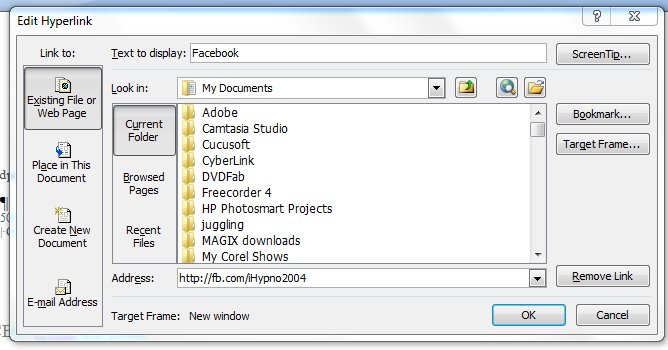
Select “Existing File or Web Page” from the “Link to:” column on the left side of the box. Across the bottom of the box, it asks for the Address. This is the URL you want your word to hyperlink to. There’s one other clever thing you can do here. Where it says ScreenTip…”, you can enters some information that you want to appear when a person mouses over that part of your signature. So, for example, you might put “Find us on Facebook”, or “Follow us on Twitter” if it had been a link to your Twitter account. Click “OK” to save your changes – obviously! You can do that with each part of your signature. The ScreenTip acts in much the same way as adding a title tag to your html link.
So, not much of a change superficially, but some of those links are now shorter. Which means that my new-look corporate signature looks like:
Trevor Eddolls CEO iTech-Ed Ltd
IBM Champion
P. 01249 443256 | M. 07901 505 609 | E-mail | Web site |
Blog | Twitter | Facebook | LinkedIn | G+ |
Arcati Yearbook | Virtual IMS user group | Virtual CICS user group
You may not be too bothered about the appearance of my signature, but you might like to shorten some of the URLs hidden away in your signatures too.
Sunday, 26 September 2010
Where are they now?
The Mainframe Zone blog at www.mainframezone.com/blog/role-of-isvs-and-the-mainframes-success ran a story about the role of ISVs in the mainframe's success. This prompted a number of responses on MainframeZone at LinkedIn (www.linkedin.com/groupItem?view=&gid=2196066&type=member&item=29244200&commentID=-1#lastComment). More importantly, it resulted in an explosion of trips down Memory Lane for me and my colleagues.
We remembered the time Goal Software took us by helicopter to watch motor racing. We laughed at some of our trips abroad funded by companies that are also no longer with us. Our all expenses paid meals out, etc etc, and we concluded that the sign of a company in peril was inversely proportional to amount and the cost of things they’d give away to consultants and journalists.
Anyway, the original Mainframe Zone article said:
"In 1970, primarily due to anti-trust pressure from the Federal Government as well as an independent lawsuit by Applied Data Research, IBM made the decision to “unbundle” software costs and hardware costs. This meant that over the past 40 years independent software vendors (ISVs) have been able to compete on a even basis with IBM for mainframe software product sales.
"Starting with ADR’s Autoflow, a fairly large number of ISVs have successfully marketed system and application software products that have significantly added value to mainframe systems."
The blog went on to ask which non-IBM software products have been significant to the success of the mainframe?
What fuelled our first trip down Memory Lane was a response from Scott Hatanaka. He said: “There have been many influential ISV software products over the years. Many of them STILL market leaders”. He went on to list:
File-aid, Abendaid, Xpediter (Compuware)
Omegamon (formerly Candle, now IBM)
SAS
The UCC products 1,7,11 (now CA)
ACF2, already mentioned
MIM (formerly STAM/SDSI-formerly Duquesne software, I think, formerly Legent, now CA)
Connect:Direct (formerly Sterling Commerce, now IBM)
Syncsort
David Mierowsky suggested, “Candle and Omegamon – the original performance monitors set the standard”.
Dave Thorn added. “Don't forget the performance and capacity management products: MICS, BEST/1, MXG to name just a few”.
Eyal Rothfeld gave us another list of: “non-IBM software products (from ISVs) that, in my humble opinion, have been most significant to the mainframe's success:
Operations Management:
4D/New Dimension Software (Later: BMC Software) – Control-M and Control-x suite.
Enterprise Output Management:
LRS – VPS suite.
Important tools:
Sorts: Syncsort
Comparisons: Serena/Comparex.
File Transfer: Connect:Direct(formerly Sterling Commerce, now IBM)
File-aid, Abendaid, Xpediter(Compuware)
Performance Management:
Performance Optimizers: CA/PMO & QuickFetch
Serena StarTool APM, Application Performance Manager, (formerly known as StarProbe)
Application performance measurement & analysis tools – Compuware/Strobe products
TMON – ASG.
Omegamon – Candle, now: CA)
ICF Catalog Management:
Softworks – The Mechanic & later Catalog Solution (and today: Dino Software/T-REX)
Storage Management:
Innovation DP – FDR suite.
Security management:
Top Secret – CA
Vanguard Integrity Professionals – SecurityCenter and the MF Security Management solutions suite.
Systems management:
Phoenix Software International – (E)JES.
Session Managers:
Unicom – Pie suite.
NetPass.
Tubes.
Statistical analysis:
SAS.
Databases:
Software AG – ADABAS.
Sapiens and DB1.”
Michael Swanson, President at ISAM Inc quoted some figures. He said: “If you want the Top 10 ISV products in terms of market share (products in the most data centres), they are:
SAS – SAS Base – 80-89%
CA – CA-1 – 70-79%
Syncsort – SyncSort – 60-69%
Compuware – File-AID for MVS – 60-69%
Merrill Consult – MXG – 50-59%
LRS – VPS Base – 50-59%
ChicagoSoft – MVS/Quick-Ref – 50-59%
CA – CA-11 – 40-49%
Compuware – XPEDITER/TSO – 40-49%
CA – CA-JCLCheck – 40-49%”
One of the most interesting threads I’ve read in a while – check it out.
We remembered the time Goal Software took us by helicopter to watch motor racing. We laughed at some of our trips abroad funded by companies that are also no longer with us. Our all expenses paid meals out, etc etc, and we concluded that the sign of a company in peril was inversely proportional to amount and the cost of things they’d give away to consultants and journalists.
Anyway, the original Mainframe Zone article said:
"In 1970, primarily due to anti-trust pressure from the Federal Government as well as an independent lawsuit by Applied Data Research, IBM made the decision to “unbundle” software costs and hardware costs. This meant that over the past 40 years independent software vendors (ISVs) have been able to compete on a even basis with IBM for mainframe software product sales.
"Starting with ADR’s Autoflow, a fairly large number of ISVs have successfully marketed system and application software products that have significantly added value to mainframe systems."
The blog went on to ask which non-IBM software products have been significant to the success of the mainframe?
What fuelled our first trip down Memory Lane was a response from Scott Hatanaka. He said: “There have been many influential ISV software products over the years. Many of them STILL market leaders”. He went on to list:
File-aid, Abendaid, Xpediter (Compuware)
Omegamon (formerly Candle, now IBM)
SAS
The UCC products 1,7,11 (now CA)
ACF2, already mentioned
MIM (formerly STAM/SDSI-formerly Duquesne software, I think, formerly Legent, now CA)
Connect:Direct (formerly Sterling Commerce, now IBM)
Syncsort
David Mierowsky suggested, “Candle and Omegamon – the original performance monitors set the standard”.
Dave Thorn added. “Don't forget the performance and capacity management products: MICS, BEST/1, MXG to name just a few”.
Eyal Rothfeld gave us another list of: “non-IBM software products (from ISVs) that, in my humble opinion, have been most significant to the mainframe's success:
Operations Management:
4D/New Dimension Software (Later: BMC Software) – Control-M and Control-x suite.
Enterprise Output Management:
LRS – VPS suite.
Important tools:
Sorts: Syncsort
Comparisons: Serena/Comparex.
File Transfer: Connect:Direct(formerly Sterling Commerce, now IBM)
File-aid, Abendaid, Xpediter(Compuware)
Performance Management:
Performance Optimizers: CA/PMO & QuickFetch
Serena StarTool APM, Application Performance Manager, (formerly known as StarProbe)
Application performance measurement & analysis tools – Compuware/Strobe products
TMON – ASG.
Omegamon – Candle, now: CA)
ICF Catalog Management:
Softworks – The Mechanic & later Catalog Solution (and today: Dino Software/T-REX)
Storage Management:
Innovation DP – FDR suite.
Security management:
Top Secret – CA
Vanguard Integrity Professionals – SecurityCenter and the MF Security Management solutions suite.
Systems management:
Phoenix Software International – (E)JES.
Session Managers:
Unicom – Pie suite.
NetPass.
Tubes.
Statistical analysis:
SAS.
Databases:
Software AG – ADABAS.
Sapiens and DB1.”
Michael Swanson, President at ISAM Inc quoted some figures. He said: “If you want the Top 10 ISV products in terms of market share (products in the most data centres), they are:
SAS – SAS Base – 80-89%
CA – CA-1 – 70-79%
Syncsort – SyncSort – 60-69%
Compuware – File-AID for MVS – 60-69%
Merrill Consult – MXG – 50-59%
LRS – VPS Base – 50-59%
ChicagoSoft – MVS/Quick-Ref – 50-59%
CA – CA-11 – 40-49%
Compuware – XPEDITER/TSO – 40-49%
CA – CA-JCLCheck – 40-49%”
One of the most interesting threads I’ve read in a while – check it out.
Sunday, 3 January 2010
Social media – a business tool
Social networks started off being ways to stay in contact with friends or make new friends. It also provided an easy way to share photos and therefore keep up with the activities of those friends that you see less often.
You can still do that, but nowadays social networks are becoming business tools and many organizations are already using them in that way. Intel, at the end of 2008, produced its social media guidelines and encouraged employees to use social media to get the corporate message out to as many people as possible.
So, if you’re not doing it already, what should you be doing? First of all there’s Twitter. Twitter was known only to a few people a year ago, but today it’s as well known as any other social media Web site. As you probably know, Twitter is a micro-blogging site allowing 140-digit messages to be sent. You have to publicize that you’re on Twitter so that people will “follow” you – ie read your tweets. You can tweet that you’re just enjoying a cup of coffee or whatever, but for business you probably want to tweet a news headline or an appointment date and time (like the next webinar or a conference). You then put a colon and a URL where people can read more details. It you have a series of tweets on the same topic, you can use hash tags (put a hash in front of a word that’s found in each tweet). And people can now re-tweet, which means they can pass on your tweet to their friends – extending the number of people who see your message. You can use a Twitter widget so your tweets appear in your Web page. That way people who browse your Web site can see the latest information you’re sharing. And you can use things like TweetDeck to see whether anyone else is tweeting about your company. You can find my tweets at twitter.com/t_eddolls.
One related thing with Twitter… it’s often a good idea to shorten URLs so they can be included with the text within the 140-character limit. Perhaps the two best-known sites for this are Bitly (bit.ly) and Tiny URL (www.tiny.cc). Example short URLs look like: http://bit.ly/6bVer5 or http://tiny.cc/MovBb. Other URL shortening organizations are available.
Facebook is also very useful for businesses. It’s easy to set up. I would recommend that you set up a new account so that anyone who becomes your friend doesn’t get access to pictures of you falling down drunk or whatever. Once you’ve set up a company name area on Facebook, anyone can become a fan. It also gives you the opportunity to post photos and meeting dates (in Events). You can also post information about your company and publish press releases, and use the “wall” to tie everything together. If you find people are putting negative comments, you will need to add positive ones so the bad ones disappear out of site further down the page. This can also be linked to Twitter. If you want to see a good example how it can be done, look for Marmite. I also include the Facebook widget on my home page as a second way of giving people up-to-date-information. You can become a fan of iTech-Ed here (http://www.facebook.com/pages/iTech-Ed-Ltd/201736748040?v=wall&ref=search).
In addition, you can have a presence on Linkedin (www.linkedin.com), Ecademy (www.ecademy.com), Fast Pitch (www.fastpitchnetworking.com), Plaxo (www.plaxo.com), Zoominfo (www.zoominfo.com), Naymz (www.naymz.com), and a host of other communities.
Get out there and blog. There are a few big blogging sites out there – Blogger (www.blogger.com), Typepad (www.typepad.com), and WordPress (wordpress.org) – and numerous others. Blogs can be used as ways of chatting about an event or a news item. It shows a friendly face for interacting with clients and potential clients. You should always Twitter a link to your blogs and put them on your corporate Facebook page.
You can also make all your news stories available through an RSS link. For example:
>a href="teblog.xml"
title="Subscribe to news about iTech-Ed" style=
"border:1px solid; border-color:#fc9 #630 #330 #f96; padding:0 3px; font-family:Verdana, Arial, Helvetica, sans-serif; font:bold 12px; color:#fff; background:#f60; text-decoration:none; margin:4px;"<
RSS >/a<
This bit of code gives you a button without needing a graphic. You will need an XML file with it, and numerous examples can be found using Google.
You hope that your “fans” will be monitoring changes on your Web site, and you can do the same with rival organizations by using a feed aggregator. For example, Google Reader lets you subscribe to your favourite Web sites so new content comes to you when it's posted. Reader keeps track of which things you’ve read so that you only see unread items when you come back. If there’s a dark blue border around an item, Reader is marking that item as read.
Another thing to be thought about is shared content. If you have content (and by that I mean photos or videos) that could be shared with a wider audience, you can put it on sites like YouTube (www.youtube.com), Flickr (www.flickr.com), SlideShare, and others.
What about MySpace (www.myspace.com)? It gives you the opportunity to create a Web site and listen to music – but if you already have a Web site, I'm not sure what advantage the extra Web presence would give you.
Social bookmarking is very interesting. It's a mechanism that allows people to share, organize, search, and manage bookmarks of Web resources. Users save links to Web pages that they want to remember and/or share. Many social bookmarking services provide Web feeds for their lists of bookmarks, including lists organized by tags. This allows subscribers to become aware of new bookmarks as they are saved, shared, and tagged by other users. Examples of these include Delicious (delicious.com), Digg (digg.com), Reddit (www.reddit.com), and StumbleUpon (StumbleUpon), but there are lots of others, with new ones arriving all the time. It’s a good idea to put these on news pages or blog pages, but they can go anywhere. However, this can become a bit of a nightmare because there are so many. I made a start by copying the icons and then using the following code (it went on, but you get the idea):
<a id="digg" title="Share this page on Digg" href="javascript:location.href='http://digg.com/submit?v=2&url='+encodeURIComponent(document.location.href)+'&title='+encodeURIComponent(document.title)+' '"> <img src="digg.jpg" width="25" height="25" alt="Share this page on Digg" title="Share this page on Digg" style="border:0"/> </a>
<a id="stumble" title="Share this page on StumbleUpon" href="javascript:location.href='http://www.stumbleupon.com/submit?v=2&url='+encodeURIComponent(document.location.href)+'&title='+encodeURIComponent(document.title)+' '"> <img src="su.jpg" width="25" height="25" alt="Share this page on StumbleUpon" title="Share this page on StumbleUpon" style="border:0"/> </a>
<a id="delicious" title="Share this page on del.icio.us" href="javascript:location.href='http://del.icio.us/post?v=2&url='+encodeURIComponent(document.location.href)+'&title='+encodeURIComponent(document.title)+' '"> <img src="del.jpg" width="25" height="25" alt="Share this page on del.icio.us" title="Share this page on del.icio.us" style="border:0"/> </a>
<a id="reddit" title="Share this page on Reddit" href="javascript:location.href='http://reddit.com/submit?v=2&url='+encodeURIComponent(document.location.href)+'&title='+encodeURIComponent(document.title)+' '"> <img src="reddit.jpg" width="25" height="25" alt="Share this page on Reddit" title="Share this page on Reddit" style="border:0"/> </a>
This is not the best way to do it!
My advice would be to use a single button that links to multiple bookmarking sites, for example AddToAny (www.addtoany.com) or AddThis (www.addthis.com)
While making sure that staff adhere to guidelines, I would recommend any organization raises its profile and gets into social media – until the next big thing comes along.
You can still do that, but nowadays social networks are becoming business tools and many organizations are already using them in that way. Intel, at the end of 2008, produced its social media guidelines and encouraged employees to use social media to get the corporate message out to as many people as possible.
So, if you’re not doing it already, what should you be doing? First of all there’s Twitter. Twitter was known only to a few people a year ago, but today it’s as well known as any other social media Web site. As you probably know, Twitter is a micro-blogging site allowing 140-digit messages to be sent. You have to publicize that you’re on Twitter so that people will “follow” you – ie read your tweets. You can tweet that you’re just enjoying a cup of coffee or whatever, but for business you probably want to tweet a news headline or an appointment date and time (like the next webinar or a conference). You then put a colon and a URL where people can read more details. It you have a series of tweets on the same topic, you can use hash tags (put a hash in front of a word that’s found in each tweet). And people can now re-tweet, which means they can pass on your tweet to their friends – extending the number of people who see your message. You can use a Twitter widget so your tweets appear in your Web page. That way people who browse your Web site can see the latest information you’re sharing. And you can use things like TweetDeck to see whether anyone else is tweeting about your company. You can find my tweets at twitter.com/t_eddolls.
One related thing with Twitter… it’s often a good idea to shorten URLs so they can be included with the text within the 140-character limit. Perhaps the two best-known sites for this are Bitly (bit.ly) and Tiny URL (www.tiny.cc). Example short URLs look like: http://bit.ly/6bVer5 or http://tiny.cc/MovBb. Other URL shortening organizations are available.
Facebook is also very useful for businesses. It’s easy to set up. I would recommend that you set up a new account so that anyone who becomes your friend doesn’t get access to pictures of you falling down drunk or whatever. Once you’ve set up a company name area on Facebook, anyone can become a fan. It also gives you the opportunity to post photos and meeting dates (in Events). You can also post information about your company and publish press releases, and use the “wall” to tie everything together. If you find people are putting negative comments, you will need to add positive ones so the bad ones disappear out of site further down the page. This can also be linked to Twitter. If you want to see a good example how it can be done, look for Marmite. I also include the Facebook widget on my home page as a second way of giving people up-to-date-information. You can become a fan of iTech-Ed here (http://www.facebook.com/pages/iTech-Ed-Ltd/201736748040?v=wall&ref=search).
In addition, you can have a presence on Linkedin (www.linkedin.com), Ecademy (www.ecademy.com), Fast Pitch (www.fastpitchnetworking.com), Plaxo (www.plaxo.com), Zoominfo (www.zoominfo.com), Naymz (www.naymz.com), and a host of other communities.
Get out there and blog. There are a few big blogging sites out there – Blogger (www.blogger.com), Typepad (www.typepad.com), and WordPress (wordpress.org) – and numerous others. Blogs can be used as ways of chatting about an event or a news item. It shows a friendly face for interacting with clients and potential clients. You should always Twitter a link to your blogs and put them on your corporate Facebook page.
You can also make all your news stories available through an RSS link. For example:
>a href="teblog.xml"
title="Subscribe to news about iTech-Ed" style=
"border:1px solid; border-color:#fc9 #630 #330 #f96; padding:0 3px; font-family:Verdana, Arial, Helvetica, sans-serif; font:bold 12px; color:#fff; background:#f60; text-decoration:none; margin:4px;"<
RSS >/a<
This bit of code gives you a button without needing a graphic. You will need an XML file with it, and numerous examples can be found using Google.
You hope that your “fans” will be monitoring changes on your Web site, and you can do the same with rival organizations by using a feed aggregator. For example, Google Reader lets you subscribe to your favourite Web sites so new content comes to you when it's posted. Reader keeps track of which things you’ve read so that you only see unread items when you come back. If there’s a dark blue border around an item, Reader is marking that item as read.
Another thing to be thought about is shared content. If you have content (and by that I mean photos or videos) that could be shared with a wider audience, you can put it on sites like YouTube (www.youtube.com), Flickr (www.flickr.com), SlideShare, and others.
What about MySpace (www.myspace.com)? It gives you the opportunity to create a Web site and listen to music – but if you already have a Web site, I'm not sure what advantage the extra Web presence would give you.
Social bookmarking is very interesting. It's a mechanism that allows people to share, organize, search, and manage bookmarks of Web resources. Users save links to Web pages that they want to remember and/or share. Many social bookmarking services provide Web feeds for their lists of bookmarks, including lists organized by tags. This allows subscribers to become aware of new bookmarks as they are saved, shared, and tagged by other users. Examples of these include Delicious (delicious.com), Digg (digg.com), Reddit (www.reddit.com), and StumbleUpon (StumbleUpon), but there are lots of others, with new ones arriving all the time. It’s a good idea to put these on news pages or blog pages, but they can go anywhere. However, this can become a bit of a nightmare because there are so many. I made a start by copying the icons and then using the following code (it went on, but you get the idea):
<a id="digg" title="Share this page on Digg" href="javascript:location.href='http://digg.com/submit?v=2&url='+encodeURIComponent(document.location.href)+'&title='+encodeURIComponent(document.title)+' '"> <img src="digg.jpg" width="25" height="25" alt="Share this page on Digg" title="Share this page on Digg" style="border:0"/> </a>
<a id="stumble" title="Share this page on StumbleUpon" href="javascript:location.href='http://www.stumbleupon.com/submit?v=2&url='+encodeURIComponent(document.location.href)+'&title='+encodeURIComponent(document.title)+' '"> <img src="su.jpg" width="25" height="25" alt="Share this page on StumbleUpon" title="Share this page on StumbleUpon" style="border:0"/> </a>
<a id="delicious" title="Share this page on del.icio.us" href="javascript:location.href='http://del.icio.us/post?v=2&url='+encodeURIComponent(document.location.href)+'&title='+encodeURIComponent(document.title)+' '"> <img src="del.jpg" width="25" height="25" alt="Share this page on del.icio.us" title="Share this page on del.icio.us" style="border:0"/> </a>
<a id="reddit" title="Share this page on Reddit" href="javascript:location.href='http://reddit.com/submit?v=2&url='+encodeURIComponent(document.location.href)+'&title='+encodeURIComponent(document.title)+' '"> <img src="reddit.jpg" width="25" height="25" alt="Share this page on Reddit" title="Share this page on Reddit" style="border:0"/> </a>
This is not the best way to do it!
My advice would be to use a single button that links to multiple bookmarking sites, for example AddToAny (www.addtoany.com) or AddThis (www.addthis.com)
While making sure that staff adhere to guidelines, I would recommend any organization raises its profile and gets into social media – until the next big thing comes along.
Subscribe to:
Posts (Atom)