Saturday, 18 August 2012

Why is everyone talking about Hadoop?

Hadoop is an Apache project, which means it’s open source software, and it’s written in Java. What it does is support data-intensive distributed applications. It comes from work Google were doing and allows applications to use thousands of independent computers and petabytes of data.

Yahoo has been a big contributor to the project. The Yahoo Search Webmap is a Hadoop application that is used in every Yahoo search. Facebook claims to have the largest Hadoop cluster in the world. Other users include Amazon, eBay, LinkedIn, and Twitter. But now, there’s talk of IBM taking more than a passing interest.

According to IBM: “Apache Hadoop has two main subprojects:
  • MapReduce – The framework that understands and assigns work to the nodes in a cluster.
  • HDFS – A file system that spans all the nodes in a Hadoop cluster for data storage. It links together the file systems on many local nodes to make them into one big file system. HDFS assumes nodes will fail, so it achieves reliability by replicating data across multiple nodes.”

It goes on to say: “Hadoop changes the economics and the dynamics of large-scale computing. Its impact can be boiled down to four salient characteristics. Hadoop enables a computing solution that is:
  • Scalable – New nodes can be added as needed, and added without needing to change data formats, how data is loaded, how jobs are written, or the applications on top.
  • Cost effective – Hadoop brings massively parallel computing to commodity servers. The result is a sizeable decrease in the cost per terabyte of storage, which in turn makes it affordable to model all your data.
  • Flexible – Hadoop is schema-less, and can absorb any type of data, structured or not, from any number of sources. Data from multiple sources can be joined and aggregated in arbitrary ways enabling deeper analyses than any one system can provide.
  • Fault tolerant – When you lose a node, the system redirects work to another location of the data and continues processing without missing a beat.”

According to Alan Radding writing in IBM Systems Magazine (http://www.ibmsystemsmag.com/mainframe/trends/whatsnew/hadoop_mainframe/) IBM “is taking a federated approach to the big data challenge by blending traditional data management technologies with what it sees as complementary new technologies, like Hadoop, that address speed and flexibility, and are ideal for data exploration, discovery and unstructured analysis.”

Hadoop could run on any mainframe already running Java or Linux. Radding lists tools to make life easier like:
  • SQOOP – imports data from relational databases into Hadoop.
  • Hive – enables data to be queried using an SQL-like language called HiveQL.
  • Apache Pig – a high-level platform for creating the MapReduce programs used with Hadoop.

There’s also ZooKeeper, which provides a centralized infrastructure and services that enable synchronization across a cluster.

Harry Battan, data serving manager for System z, suggests that 2,000 instances of Hadoop could run on Linux on the System z, which would make a fairly large Hadoop configuration.

Hadoop still needs to be certified for mainframe use, but sites with newer hybrid machines (z114 or z196) could have Hadoop today by putting it on their x86 blades, for which Hadoop is already certified, and it could then process data from DB2 on the mainframe. But you can see why customers might be looking to get it on their mainframes because it gives them a way to get more information out of the masses of data they already possess. And data analysis is often seen as the key to continuing business success for larger organizations.

Sunday, 12 August 2012

IBM and RIM

There was a time when getting out your BlackBerry was synonymous with being a cool young executive. You can remember people who had phones that beeped every time they received an e-mail, and they would act like they were the Fonz. But then a different fruit became king of the hill – Apple. You weren’t anyone without an iPhone. And now it’s probably Android for the really cool kids because you can control it – without needing to jail break it!

BlackBerry had a second wind. Lots of youngsters used BlackBerries because of the messaging facility. They could chat to their friends – using BBM – for free.

Research In Motion (RIM) – the company that makes BlackBerry phones – is based in Waterloo, Ontario, Canada. In January this year, Thorsten Heins took charge as CEO. He must be wondering what he can do to re-invigorate the firm. But there’s more to RIM than just the BlackBerry phone. There’s meant to be a new BlackBerry 10 operating system coming out next year, but, perhaps more importantly, RIM has a BlackBerry Enterprise Services (BES) unit, which operates a network of secure servers used to support BlackBerry devices.

The rumour mill suggests that this is what IBM has its eye on. And this is the reason that RIM stock jumped up by 9 percent. Although, at this stage, it is only a rumour. Both companies are saying the usual thing about not commenting on rumours – instead of looking blankly at the questioner and going, “what!!”.

Were IBM to buy the whole of RIM, that would be a very bold decision. As I said, the BlackBerry 10 operating system doesn’t come out until early next year. It might be possible to licence the OS to third parties, or they could sell off RIM’s Network Operations Centre (NOC). The NOC transmits all BlackBerry data for both enterprise and consumers. If IBM were to keep the handset division, they would need to encourage developers to write apps for them. At the moment there are apps for iPhones, Android, and, when the new Surface tablet comes out with Windows 8, there’s likely to be a lot of development enthusiasm there. But I’m not sure there’s any real excitement to develop apps for the BlackBerry.

So, it’s more likely that IBM has its sights set on the enterprise services unit, which has pretty good security software that it uses to give IT departments control over corporate information. The encryption algorithms its uses make it very difficult for anyone to intercept e-mails or instant messages (BBM). This makes it very popular with people in banking and other financial services. According to RIM, there are 250,000 BlackBerry Enterprise Services (BES) servers installed worldwide.

However, if IBM doesn’t buy the NOC part of the business, they’ll need to come to some sort of working agreement with RIM (or whoever owns that part) over who has control over IBM’s customers’ traffic using it.

From a BlackBerry customer perspective, knowing IBM was looking after enterprise services would seem like a good thing. From IBM’s perspective, they would get access to a way of transmitting secure data from a platform that they don’t currently include in their portfolio – mobile computing. And IBM could add the software into (probably) WebSphere.

But whether IBM should do it or not depends on how much it’s going to cost them. RIM may well claim that they are making pots of money from the fees they charge mobile carriers for subscriber access to their network. They may say that the new operating system will see a resurgence of their popularity. If that were the case, then I would advise IBM to walk away now. If, on the other hand, IBM can get access to the security algorithms and the servers in use at financial institutions for a reasonable sum, then why not? Or if IBM thinks Oracle might be interested – then perhaps they should snap it up.

But, who knows? After all, it’s only a rumour!

Monday, 6 August 2012

Keeping it short

I was looking at my e-mail signature this week and thinking about what it needs to say. I then discovered that some of the hyperlinks in that signature were incredibly long – much longer than they needed to be. And I thought that perhaps other people might benefit from similarly shorter hyperlinks in their signatures.

So let’s have look at my old signature:

Trevor Eddolls CEO iTech-Ed Ltd
IBM Champion
P. 01249 443256 | M. 07901 505 609 | E-mail | Web site |
Blog | Twitter | Facebook | LinkedIn | Arcati Yearbook | Virtual IMS user group | Virtual CICS user group


The top line stays the same – it’s good to tell people who you are, your job title, and the name of the company in your signature!

I wanted to keep “IBM Champion” – I’ve been an IBM Champion since 2009.

And the phone numbers haven’t changed since 2004, although the devices I use have. I disconnected the fax a few years ago and finally threw it out last year!

It was that bottom list that caused the issues. My company has a (fan) page on Facebook, and that originally had a URL like http://www.facebook.com/pages/iTech-Ed-Ltd/201736748040. Since then, we’ve set up a username for it, so the address I wanted to publish was fb.com/itech-ed – which is obviously so much shorter. If you haven’t got a short name for your business page, you enter fb.com/username on the address line of your browser. Provided you have more than 25 likes on your page, Facebook will tell you whether you can have a short name for the page and whether your choice is available. The rule is that you only get one chance – so make sure you choose a good, memorable, and appropriate name.

I also wanted to add my Google plus address. The URL for that is https://plus.google.com/u/0/108580724051942905828/posts. You can get a much shorter name by going to http://gplus.to/. I got a short name from there. So, now, my Google plus address is http://gplus.to/teddolls.

With LinkedIn, I managed to change the address for my personal profile from http://www.linkedin.com/profile/view?id=3544583 to http://www.linkedin.com/in/teddolls, which makes more sense, but then requires a second click to get to the profile page. You can do much the same.

The Web site addresses I couldn’t really shorten without them losing a sense of where the link would end up. Just using bitly or tiny url wouldn’t have provided any sense of security to an e-mail recipient about where clicking on that link would actually end up.

What I decided to do with the look of my signature was to group social media on one line and other Web sites on a second line. This prevents that line of links sbeing too long itself!

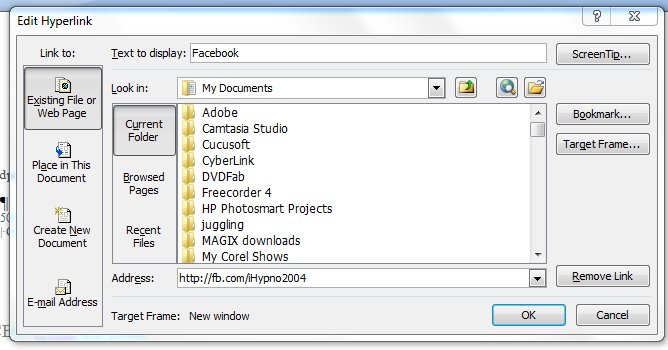
The easiest way to actually create the signature in the first place is to use Word. You can write the text and format it. The clever bit is to take a word – like Facebook – and put in the link. You simply select the word, press ctrl and k at the same time, and put the information you want in the pop-up box (see below).


Select “Existing File or Web Page” from the “Link to:” column on the left side of the box. Across the bottom of the box, it asks for the Address. This is the URL you want your word to hyperlink to. There’s one other clever thing you can do here. Where it says ScreenTip…”, you can enters some information that you want to appear when a person mouses over that part of your signature. So, for example, you might put “Find us on Facebook”, or “Follow us on Twitter” if it had been a link to your Twitter account. Click “OK” to save your changes – obviously! You can do that with each part of your signature. The ScreenTip acts in much the same way as adding a title tag to your html link.

So, not much of a change superficially, but some of those links are now shorter. Which means that my new-look corporate signature looks like:

Trevor Eddolls CEO iTech-Ed Ltd
IBM Champion
 
P. 01249 443256 | M. 07901 505 609 | E-mail | Web site |
Blog | Twitter | Facebook | LinkedIn | G+ |
Arcati Yearbook | Virtual IMS user group | Virtual CICS user group

You may not be too bothered about the appearance of my signature, but you might like to shorten some of the URLs hidden away in your signatures too.

Monday, 30 July 2012

Whatever happened to IPv6?

IPv4 is pretty much everywhere. It uses 32-bit addresses, which means (and you can check the maths on this) that there is a finite number of IP addresses that people can use – 4,294,967,296 addresses, in fact. Although the number of available addresses seems pretty large, you only have to look round at how online everything is to recognize that those addresses will run out. In fact, they already have – although techniques such as Network Address Translation (NAT), classful network design, and Classless Inter-Domain Routing have helped to keep everything working.

Back in the 1990s people (including me) were writing about the address limitation of IPv4, and the proposed solution was IPv6, which, after a very long gestation period, became commercially available in 2006. World IPv6 Launch day was as recently as 6 June 2012. The big selling point of IPv6 is that it uses 128-bit addressing, which results in far more addresses being available for people to use – 340,282,366,920,938,463,463,374,607,431,768,211,456 apparently.

An IPv4 address looks like: 192.169.1.62. An IPv6 address looks like: 2001:0db8:85a3:0042:0000:8a2e:0370:7334. And that’s the problem that many organizations face. How to they convert from IPv4 to IPv6? How do they translate their addresses? How do they test these new addresses when they need to maintain a working business environment?

William Data Systems (WDS) has come up with a new module for its ZEN system called the ZEN Application Gateway – or ZAG. WDS has found that many of its customers are currently facing the costs and risks of changes to applications, networks, and hardware. ZAG helps implement IPv6 under z/OS by minimizing the need for companies to make any changes to their applications, hardware, or networks. ZAG users can input IPv4 and get out IPv6, or they can do things the other way round.

And while z/OS sites are able to run separate IPv4 and IPv6 stacks – in fact, keeping the two IP stacks segregated like this may be something many chose to do because it enables them to keep their IPv6 testing traffic separate from their production IPv4 traffic – one thing they could use ZAG for is to sit in between the two stacks and act as a bridge, allowing IPv6 clients in one stack to access IPv4 applications in another stack (and vice versa). Obviously, sites could do achieve the same thing without ZAG, but they would need to weigh up the additional costs and risks (as well as management time) resulting from application, network, and hardware changes.

According to WDS’s press release, ZAG “allows customers to:
  • Test new IPv6 applications using their existing IPv4 infrastructure
  • Access their IPv4 applications from new IPv6 clients
  • Segregate their IPv6 and IPv4 traffic on different IP stacks
  • Act as a bridge, allowing traffic to connect between IPv6 and IPv4 stacks
  • Provide pseudo Network Address Translation (NAT) capabilities in an IPv6 environment, which is very useful if you want to hide internal IPv6 addresses from the outside world.”

If you are at SHARE in Anaheim between 5 and 10 August, WDS will be demonstrating their ZEN suite on a Raspberry Pi. WDS comment this is: “just in case hardware budgets keep reducing!” Adding that one lucky delegate will win the Raspberry Pi in the SHARE prize draw. 


Here’s a photo of their Raspberry Pi in action!

Moving from the limited IPv4 to IPv6 is something that people have been talking about for a long time. It now looks like the time to actually migrate is here. Anything that makes the job easier (and the painless) has got to be a good thing.

Sunday, 22 July 2012

IBM and Social Business

When Nobel Peace Prize laureate Prof Muhammad Yunus first discussed social business in his books “Creating a world without poverty – Social Business and the future of capitalism” and “Building Social Business – The new kind of capitalism that serves humanity’s most pressing needs”, he was thinking of a non-loss, non-dividend company designed to address a social objective within a highly-regulated marketplace. Nowadays, the term is usually applied to businesses that utilize social networking tools and practices for internal and external functions. And to help with that, this week, IBM has introduced its Intranet Experience Suite.

According to IBM’s Web site: “Social businesses effectively engage employees, improving productivity, and business results. Intranet Experience Suite can help your organization to become a social business by leveraging social software, content, and collaboration within a seamless employee Web experience across mobile and other channels.”

The new software combines social networking, mobile computing, and, of course these days, analytics to front office operations and externally to clients. The software integrates an organization’s information and data, personalized content, news and social media, and analytics, so that employees can connect, collaborate, and access information whenever they want from any location.

IBM is claiming that with the Intranet Experience Suite, an organization can move forward to becoming a “social business by leveraging social software, content and collaboration within a seamless employee Web experience across mobile and other channels.”

The Web site goes on to explain that it does this by creating an engaging employee experiences because applications, content, and key social services can be combined contextually for each employee across any channel.

It improves efficiency because it speeds access to the correct information and applications securely, both in an office environment or remotely via mobile devices.

It fosters innovation because users exchange ideas with, and benefit from, subject matter experts with profiles and with collaborative tools such as forums, blogs, and files.

It empowers employees because it enable business users to create and manage intranet Web content.

The Web site also suggests it will “discover incremental ROI” through reuse of existing IT investments, such as legacy enterprise applications, by extending functions to more users; and decrease costs by automating paper-based processes, and helping employees do their jobs faster.”

Interestingly, the product components are:
  • IBM WebSphere Portal Server – aggregates applications and content as role-based applications.
  • IBM Connections Files and Profiles – helps employees find experts and post, share, and discover documents quickly and in context.
  • IBM Web Content Manager – increases the efficiency and accuracy of Web site deployments.
  • IBM Forms – automates forms-based business processes to help improve efficiency, customer service, and time to value, making an organization more responsive to customer and market needs.
  • IBM Web Experience Factory Designer – delivers enterprise ready, standards based, Web 2.0 applications with interactive interfaces.
  • IBM Sametime – provides a unified user experience across a broad range of integrated, real-time communications services.
  • IBM Content Analytics with Enterprise Search – analyses employee’s interactions and activities via integration with supported analytics solutions.
Most organizations have some kind of intranet and are using social media. So yet again (recently I was talking about IBM’s augmented reality app) we find IBM pushing the envelope in technologies not immediately connected to mainframes.

Sunday, 15 July 2012

Willpower

We all sit staring at computer screens for long periods during the day. In fact, some of us spend long periods in the evening staring at computer screens too! And as we sit there – getting on with whatever work needs doing, working through our e-mail, and occasionally checking Facebook to see what people with a life are doing – are we affecting our ability to crack on and really persevere with challenges? That’s a question that was answered back in 1984. And the answer is YES!

I’ve been to some organizations where people plug their laptops into workstations resulting in the screen being quite high up and the user having to then use a second keyboard and a mouse because they can’t reach the laptop’s keyboard in this position. They have to look up to do any useful work. I always thought this was a strange and unnatural way of working.

Most people I see working on their laptops have the laptops in front of them – on a desk at work, or on their lap elsewhere. I’ve also seen people using tablets (and iPads) in much the same way. They are hunched over their screens getting on with their work.

So what would happen if you took these two groups of people and then gave them some kind of test – something that measured their perseverence, their willpower to stay on-task. You might think that it wouldn’t make any difference, that there would be factors other than where their computer screen had been put determining how long these people wrestled with a problematic task.

That’s what John Riskind from Texas A&M university decided to investigate – the effects of posture on perseverence. One group was made to sit upright with their shoulders back and their heads up for three minutes. The other group was made to slump for three minutes, with stooped and hunched over backs and their heads dropped down. So the two groups spent three minutes in one of these two positions, pretty much like the two positions that laptop users can adopt.

After the three minutes, participants were sent to a different room and asked to solve several geometric puzzles that involved tracing over a diagram without lifting up the pencil. To make life a bit harder, some of the puzzles were impossible to solve. Riskind timed how long people persevered trying to solve the puzzle.

And he found that people who had been sitting up straight persevered trying to solve the puzzles for almost twice as long as the people who had previously been slouching.

In 2007, picking up on that earlier work, Hyung-il, Teeters, Wang, Breazeal, and Picard asked people to actually sit at a computer and work on a difficult problem. They divided their subjects into two groups – with one group using a monitor placed low down so they had to stoop, and the second group using a monitor that was placed slightly above their eye-line, so they had to sit up straight.

By now, you can guess the results of this second piece of research. People who sat up straight because their monitor was higher up persevered for longer than the people who slouched over their monitor.

What can we conclude from these two pieces of research? Well, if you want staff at your organization to be highly motivated, you need to ensure the centre of the screens they’re using is slightly above their eye level.

If you want to look up these two studies to make sure that I’m not making this all up (it’s not the 1 April blog!), Riskind published “They stoop to conquer: Guiding with self-regulatory functions of physical posture after success and failure” in the Journal of Personality and Social Psychology (issue 47, pages 479-493, if you must know). The second study in 2007 was entitled “Stoop to Conquer: Posture and affect interact to influence computer users; persistence” and was presented at the 2nd International Conference on Affective Computing and Intelligent Interaction, 12-14 September 2007 in Lisbon, Portugal.

It makes you wonder what else we should be doing to get the most out of the human-computer interface.

Sunday, 8 July 2012

Higgs boson exists

This week saw scientists at CERN pretty much claim to have found a new subatomic particle – the boson predicted half a century ago by theoretical physicist Peter Higgs. The discovery allows physics to work because particles can now have mass. But, of course, it opens the door to lots of other questions such as why is there more matter than anti-matter in the universe.

So, in a week when scientists and non-scientists have been talking about bosons and fermions, and quarks and leptons, IBM has been pushing the envelope with an Augmented Reality (AR) app for shoppers owning a smartphone! The app, they claim, can automatically deliver personalized coupons, offers, customer reviews, and hidden product details to the potential customer.

The app doesn’t rely on barcodes or RFID tags to recognize products, but it does need a camera. The app compares a captured image with those in its database. If the product packaging matches the image-processing algorithm, it will automatically overlay digital details of the product on the image.

These details could include nutritional information, price, reviews, and discounts. And, you can opt into a social networking feature that delivers comments or reviews from friends and family about that product.

While a shopping AR app may, in many ways, seem trivial, it is opening the door for a whole new world of living. AR could be as revolutionary as the Internet. Think about it – you visit a new city, say Paris, for the first time, and on your phone screen comes information about every building and statue that the guide books know about. Or, perhaps, your car won’t start, so you point your camera at the engine and it identifies where the oil should go, or the brake fluid, etc. Not that I’d trust these ones, but an inexperienced surgeon operating on a patient could see AR information, or someone who’d never flown a plane before but needs to land it successfully (come on, you’ve seen it often enough in the movies and on TV).

Other news this week is that Dell is continuing to reposition itself with its $2.4 billion bid for Quest Software. With the growth in sales of tablet devices and the drop in sales of desktop and laptop PCs, as well as the growth in cloud computing, Dell is moving away from being just the hardware supplier that we’ve known for so long.

Quest is probably best known for its TOAD product, which is used to build, manage, and maintain databases. But Quest also has a range of other products including Shareplex, Lightspeed, Netvault, and Foglight. Dell apparently plans to make Quest, which has 1,300 software developers, the core of its software group, which it expects to grow into a $2 billion-a-year business over the next three years.

Dell’s other recent acquisitions include Wyse Technology, Make Technologies, Clerity Solutions, AppAssure, SonicWALL, and Force10 Networks.

And finally, why not become part of the IBM System z poster? Go to http://part-of-z.de/, complete the form and  upload your photo. You then have a chance of being one of the 150 faces that will appear on the poster. But if you’re not one of the chosen faces, you’ll still receive a printed poster afterwards. You’ve got until 31 July to send in your picture.